
Discord music bot with live radio
Music and live radio in your voice channels, with a queue and a button player, free on every server.
Dispatch.IO plays music and live radio in your voice channels. Join a voice channel, type /play with a track name or a link, and the bot joins you and starts playing. Add more tracks and they line up in a queue you can view, shuffle, clear or loop. For radio, /play-radio suggests up to 25 stations as you type and streams the one you pick.
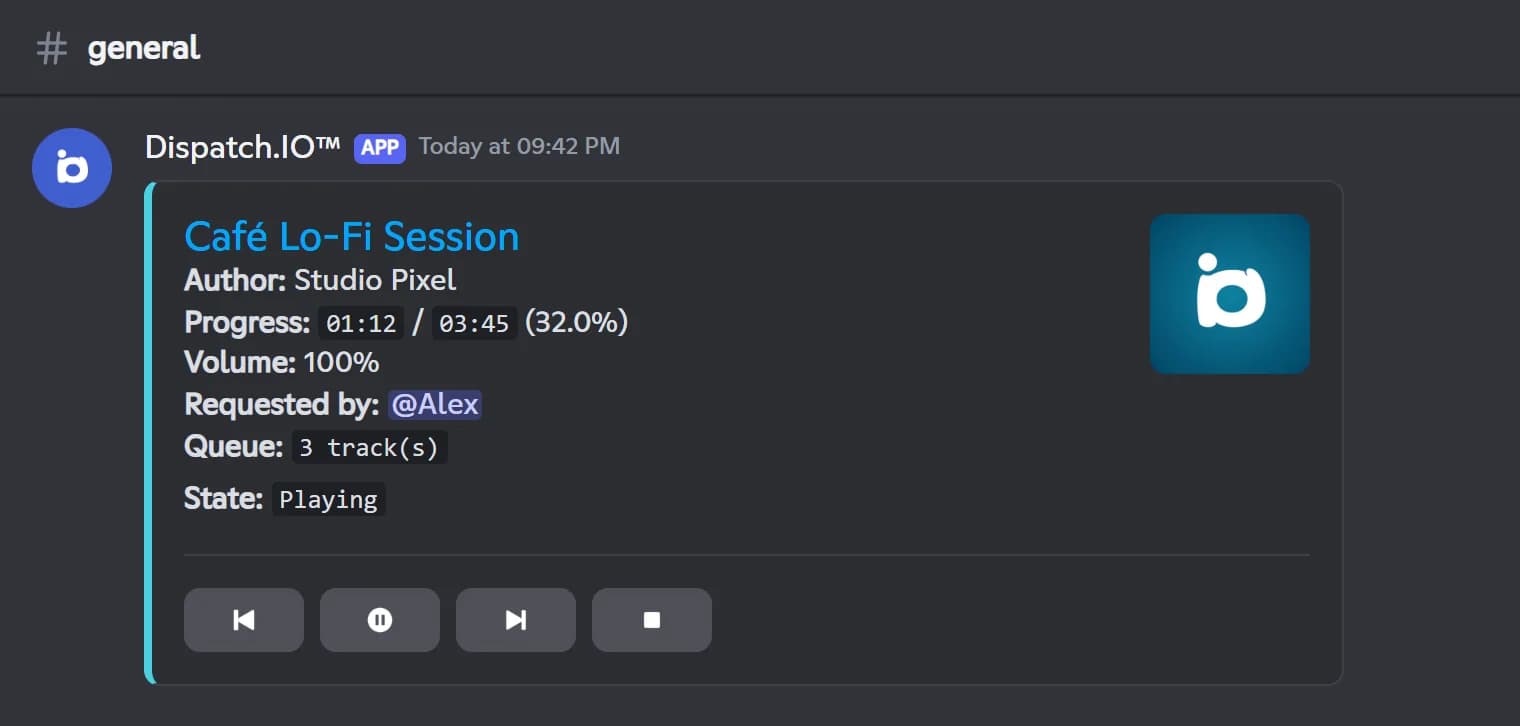
While music plays, the bot keeps a single player message up to date in the channel: track, artist, progress, volume, who requested it and what is queued, with Previous, Pause/Play, Next and Stop buttons. To stop members from cutting each other's music, only the person who requested the current track can control it while they are in the voice channel. Administrators can always step in.
The player is free on every server, with no Premium plan and no limit. There is nothing to configure in /config or on the dashboard: add Dispatch.IO, give it Connect and Speak, and type /play. When everyone leaves the voice channel, the bot stops and leaves on its own.
What it does
Play by name or link
Search by name with up to 10 suggestions, paste a link, or add a whole playlist at once.
Live radio
Pick from up to 25 stations as you type and stream them live in your voice channel.
Button player
One message shows the track, progress, volume and queue, with Previous, Pause, Next and Stop buttons.
Full queue control
View, shuffle or clear the queue, jump to any track and loop a track or the whole queue.
No one cuts your song
Only the member who requested the track can pause or skip it while they are in the channel.
Free, no limits
Music and radio work on every server with no Premium plan and no limit.
Ready in 3 steps
- 1
Add the bot
Invite Dispatch.IO and make sure it has Connect and Speak in your voice channels.
- 2
Launch a track
Join a voice channel and type /play with a track name, or /play-radio with a station.
- 3
Listen together
The player message appears with its buttons, and everyone in the channel listens together.
Main commands
FAQ
How do I play music in a Discord voice channel?
Add Dispatch.IO to your server, join a voice channel and type /play followed by a track name or a link. The bot joins your channel and starts playing, or adds the track to the queue if something is already on. It needs the Connect and Speak permissions in that voice channel.
Is the Dispatch.IO music bot free?
Yes. Music and radio are free on every server and work the same on every plan. Premium plans don't change anything about the player.
How do I play a live radio station on Discord?
Use /play-radio and start typing the station name: Discord suggests up to 25 matching stations. Pick one and the bot streams it live in your voice channel. Radio has no queue and no pause; stop it with /stop or the Stop radio button.
Can I paste a YouTube link in /play?
No. YouTube links are disabled and the bot replies that they are not accepted. Search for the track by its name instead: /play suggests up to 10 results as you type.
When does the music bot leave the voice channel?
As soon as no member is left in its voice channel, the bot stops the music and leaves right away. When the queue simply ends, it stays connected and waits for another /play. You can disconnect it at any time with /stop.
Discord music bot with live radio
Dispatch.IO is a free Discord music bot: play tracks and live radio in voice channels, manage the queue and control it all from one button player.
Go further
Discord bot for temporary voice channels
Members open their own voice channel by joining a creator channel, and it disappears once empty.
Discord leveling bot: XP, level roles and leaderboards
Members earn XP by chatting and in voice, level up and unlock roles, with a leaderboard to chase.
Discord giveaway bot, with polls and suggestions
Giveaways with automatic draws, live polls, a suggestions box and a counting game to keep your server active.