
Discord bot for temporary voice channels
Members open their own voice channel by joining a creator channel, and it disappears once empty.

With Dispatch.IO, you pick a creator voice channel, for example ➕ Create a channel. Every member who joins it gets their own voice channel, created in the same category and named after them, and is moved into it right away. Once everyone has left, the channel is deleted 5 seconds later. No more empty voice channels piling up.
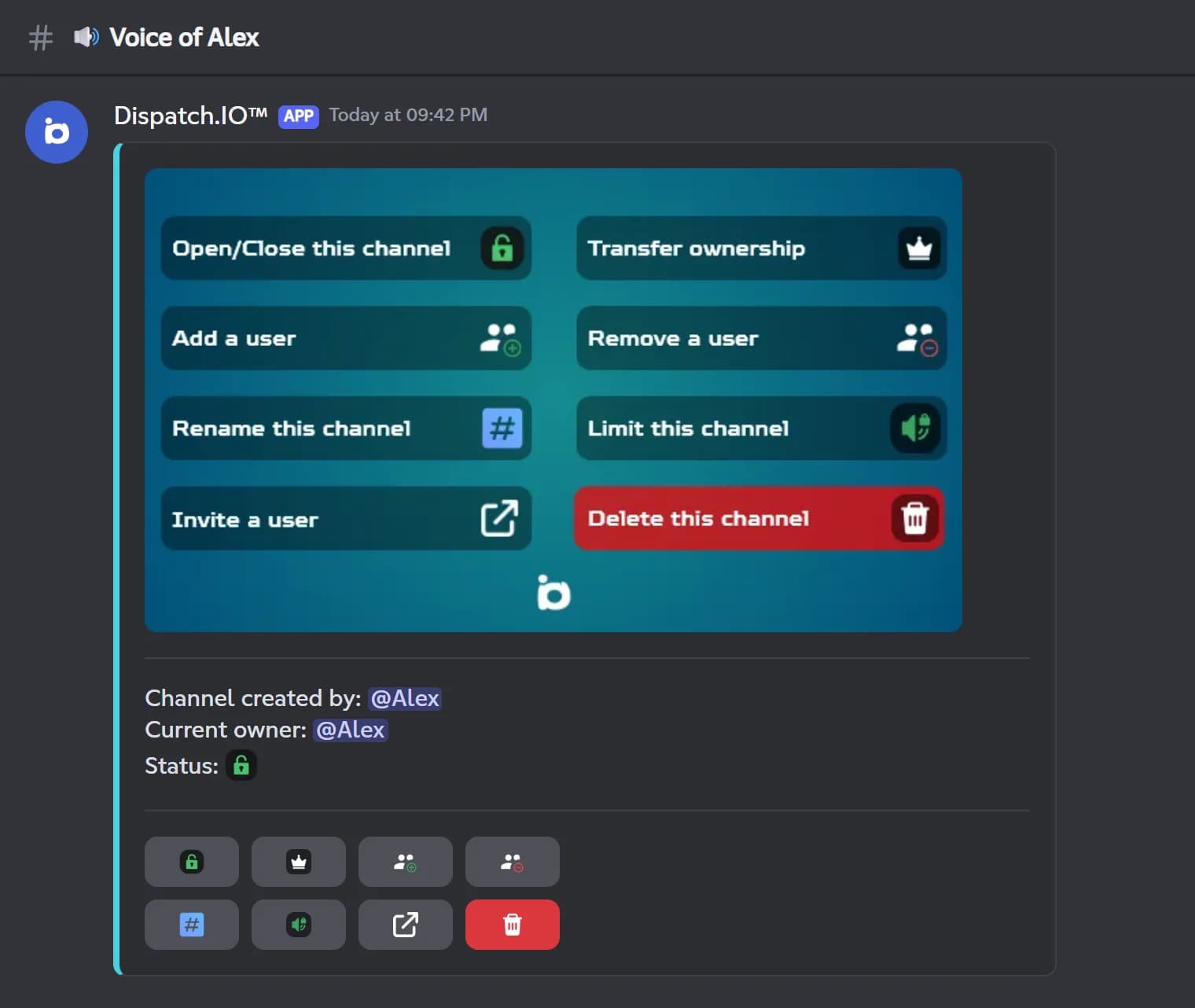
The owner controls their channel from a panel posted in its text chat: lock or unlock it, add or remove a member, rename it, set a member limit, send an invite by DM, hand over ownership or delete it. If the owner leaves, the first member still inside takes over. You choose which roles can join, and your staff always can.
Dispatch.IO also handles temporary text channels: every new message is deleted after a delay from 10 seconds to 2 hours, with the option to keep pinned messages. Handy for a bot-commands or spam channel. Everything is free and set up from Discord with /config or from the web dashboard. Temporary text channels are unlimited; the free plan includes 3 creator voice channels, and that quota grows with the Basic and Ultimate plans.
What it does
Voice channels on demand
Joining the creator channel opens a voice channel named after the member, in the same category.
Automatic cleanup
Deleted 5 seconds after the last person leaves, so your server stays tidy.
Owner control panel
Lock, add or remove members, rename, set a limit, invite by DM, transfer or delete.
You choose who joins
Pick the roles that can join; staff and members added from the panel always get in.
Temporary text channels
Messages delete themselves after 10 seconds to 2 hours, pinned messages can be kept.
Ready in 3 steps
- 1
Add the bot
Invite Dispatch.IO with the Administrator permission it needs to manage channels and roles.
- 2
Set a creator channel
In /config or on the dashboard, pick a creator voice channel, the allowed roles and the name prefix.
- 3
Channels come and go
Members join it, get their own channel with its panel, and it disappears once empty.
Main commands
FAQ
How do I create temporary voice channels on Discord?
Add Dispatch.IO, then pick a creator voice channel in /config or on the Temporary channels page of the dashboard. Every member who joins it gets a personal voice channel and is moved into it. The channel is deleted 5 seconds after the last person leaves.
Why can't members join a temporary voice channel?
If you don't pick any allowed role, only the owner, your staff roles and members added from the panel can connect. To open the channels to everyone, add a role all your members have as an allowed role.
How does a member manage their own voice channel?
The owner uses the panel posted in the channel's text chat: lock, add or remove a member, rename, set a member limit, invite by DM, transfer ownership or delete. Administrators can use the panel at any time.
How many creator voice channels can I set up?
The free plan includes 3 creator voice channels, and that number grows with the Basic and Ultimate plans. Each creator channel can open as many temporary voice channels as needed.
Can Discord messages delete themselves after a while?
Yes. Add the channel as a temporary text channel and pick a delay from 10 seconds to 2 hours: every new message is deleted after that delay. You can keep pinned messages, which is useful for the channel rules.
Discord bot for temporary voice channels
Dispatch.IO creates temporary voice channels on demand on Discord, with an owner control panel and auto-deletion when empty. A tidy server, no cleanup.
Go further
Discord music bot with live radio
Music and live radio in your voice channels, with a queue and a button player, free on every server.
Discord welcome bot: messages, cards and auto roles
Greet every newcomer with a message and a custom card, hand out roles automatically and announce departures.
Discord moderation bot
Warnings, timeouts, kicks and bans with a full infraction history and automatic filters.