
Discord streak bot: daily flames for your server
One flame for every active day, freezes for the days off and a leaderboard to keep your members coming back.

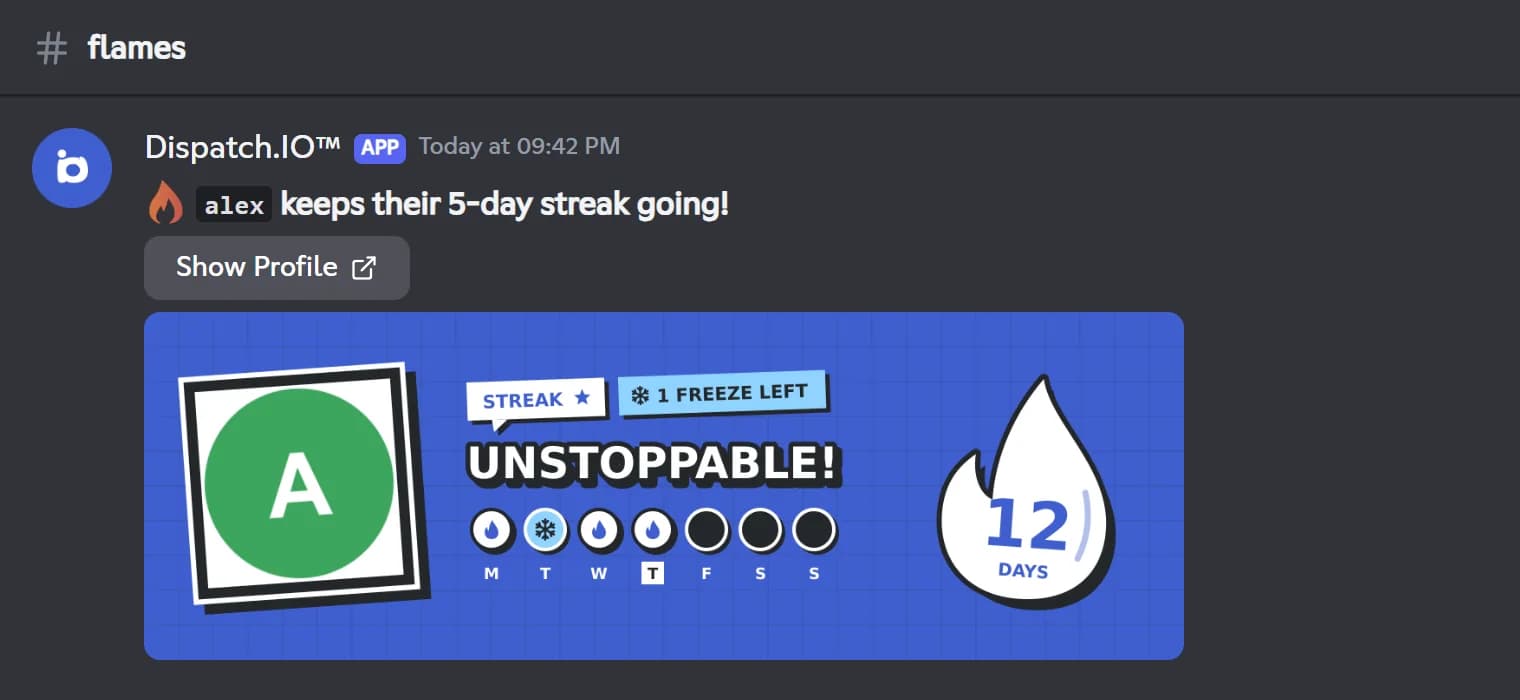
Dispatch.IO flames are daily streaks that reward showing up. Every day a member sends a message, hangs out in voice or uses a public bot command, their streak gains a flame. Days follow your server's time zone, and the bot announces each validated day with a flame card showing the current week.
Missing a day breaks the streak, unless a freeze covers it: every member gets 1 per month, used automatically (2 or 5 with a personal plan). You can also add the streak to members' nicknames and ping them at milestones: day 7, day 14, then every 30 days. /top streak shows the ranking of current streaks, and everyone's best streak stays visible on the public leaderboard on the website.
The module is free: flames, announcements, freezes, milestone pings and nickname updates are included in every plan. Streak reward roles and a server flame image need the Ultimate plan. Turn flames on from Discord with /config or on the web dashboard.
What it does
One flame per active day
A message, voice activity or a public Dispatch.IO command: the first activity of the day validates the flame.
Automatic freezes
A freeze saves a missed day with no command needed: 1 per month by default, 2 or 5 with a personal plan.
Flame card
Every validated day is announced with a card showing the week: active, frozen and missed days.
Streak in the nickname
The bot can add the streak to the member's nickname and updates it every day.
Milestone pings
Members get pinged at 7 days, 14 days, then every 30 days.
Leaderboards and records
/top streak on Discord, plus a public leaderboard and a 12-month history on the website.
Ready in 3 steps
- 1
Add Dispatch.IO
Invite the bot from the website with the Add to Discord button. You need the Manage Server permission on that server.
- 2
Enable flames
Turn flames on in /config or on the dashboard and pick the announcement channel. Check the server's time zone (Europe/Paris by default).
- 3
Keep the streaks going
Each day, a member's first activity validates their flame: the bot announces it and the streak grows as long as they keep coming back.
Main commands
FAQ
How do I set up streaks on Discord?
Add Dispatch.IO, then turn flames on in /config (Daily Streak System category) or on the Flames page of the dashboard, and pick a flames channel. On a server that has never been set up, you need to click Enable twice in /config. The bot needs the Manage Channels permission.
What counts toward the daily streak?
The first activity of the day: a message in any channel, voice activity (joining, leaving, switching channels or changing voice state) or a Dispatch.IO command with a public reply. Commands whose reply only you can see do not count.
How do streak freezes work?
A freeze saves a missed day, automatically, when the Flame freezes option is on for the server (it is by default). Each member gets 1 freeze per month, 2 with Individual Basic and 5 with Individual Ultimate. It is all or nothing: if there are not enough freezes to cover every missed day, the streak starts over at 1.
When does the streak reset?
The day changes at midnight in the server's time zone, Europe/Paris by default. Streaks are not reset every night: one only ends when a whole day goes by with no activity and no freeze.
Can I reward long streaks with roles?
Yes, with the Ultimate plan on the server: you tie a role to a streak day, from 1 to 999. The role can be permanent or temporary, removed once the streak goes past that day.
Discord streak bot: daily flames for your server
Dispatch.IO is a free Discord streak bot: one flame per active day, freezes to save a missed day and a leaderboard. Bring your members back every day.
Go further
Discord leveling bot: XP, level roles and leaderboards
Members earn XP by chatting and in voice, level up and unlock roles, with a leaderboard to chase.
Discord giveaway bot, with polls and suggestions
Giveaways with automatic draws, live polls, a suggestions box and a counting game to keep your server active.
Discord welcome bot: messages, cards and auto roles
Greet every newcomer with a message and a custom card, hand out roles automatically and announce departures.