
Discord welcome bot: messages, cards and auto roles
Greet every newcomer with a message and a custom card, hand out roles automatically and announce departures.

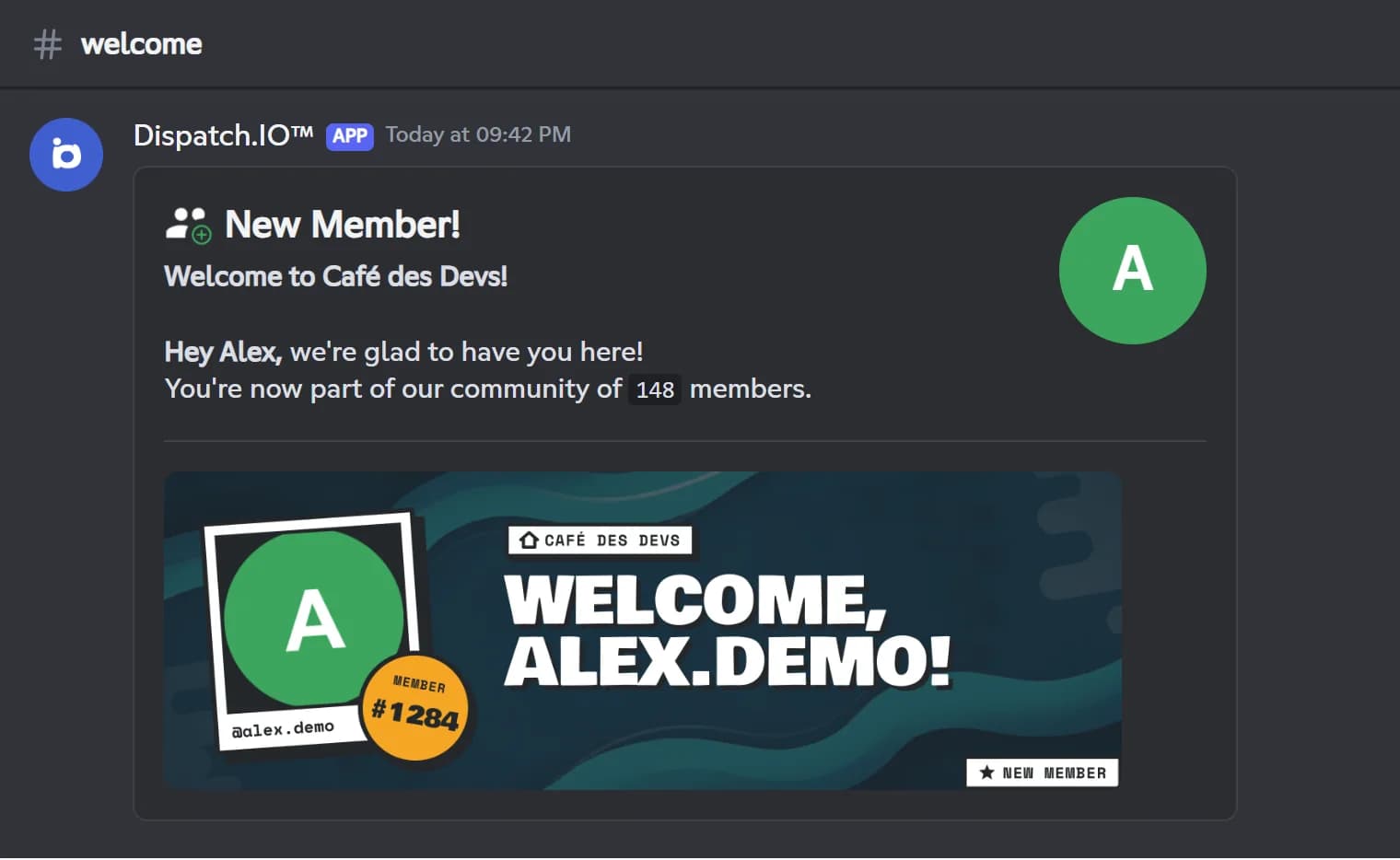
Dispatch.IO greets every new member in the channel of your choice with a welcome message and an illustrated card drawn by the bot: their avatar, their name and their member number on your server's background. Keep the default text or write your own with variables such as {user}, {guildName} or {guildMemberCount}; with a custom message, the newcomer also gets it as a direct message.
Right after the greeting, the bot hands out your welcome roles. Since they are only given once the anti-raid and the captcha have let the member through, they work great as a "verified" role: lock your channels to that role and only checked members will see them. Departures get their own goodbye message and card, showing how many members are left.
The module is free, with no limit tied to Premium plans. Set it up from Discord with /config (Welcome category) or on the web dashboard, then hit Test Welcome Message to see exactly what your new members will receive.
What it does
Welcome card
A 1200 × 400 image with the member's avatar, name and member number, on your server's background.
Custom message
Up to 2000 characters, Discord formatting and the {user}, {userName}, {guildName} and {guildMemberCount} variables.
Direct message
With a custom message, the newcomer also receives the greeting as a direct message.
Auto roles
Welcome roles are given on every join, after the anti-raid and captcha checks.
Built-in captcha
The anti-raid captcha asks for a 6-character code before the greeting; members who fail are kicked.
Goodbye message
Departures are announced in the channel you choose, with a card showing the remaining member count.
Ready in 3 steps
- 1
Add Dispatch.IO
Invite the bot from the website with the Add to Discord button. You need the Manage Server permission on that server.
- 2
Set up the greeting
Pick a text channel for arrivals, your welcome roles and, if you like, your own message and image, in /config or on the dashboard.
- 3
Welcome your members
Hit Test Welcome Message to check the result: every newcomer then gets their message, card and roles automatically.
Main commands
FAQ
How do I set up a welcome message on Discord?
Add Dispatch.IO to your server, then pick an arrivals channel in /config (Welcome category) or on the dashboard. From then on, the bot posts a message and a card for every new member. You can replace the default text with your own message and variables such as {user}.
How do I give new members a role automatically?
Add one or more welcome roles in the module settings. The bot needs the Manage Roles permission, and each role must sit below the bot's highest role. Roles are given right after the welcome message.
How do I ping the new member in the welcome message?
The default text does not mention the member. Write a custom message containing the {user} variable: it is replaced with a mention of the member, who then gets a notification.
Can I verify new members with a captcha?
Yes, the captcha is part of the Dispatch.IO anti-raid. The member has 3 minutes to type a 6-character code, otherwise they are kicked. The welcome message and roles only come after they pass.
Is the welcome bot free?
Yes. The welcome and goodbye module has no limit tied to Premium plans. Only the personal backgrounds members put on their own cards depend on their personal plan.
Discord welcome bot: messages, cards and auto roles
Dispatch.IO is a free Discord welcome bot: welcome messages and cards, auto roles, captcha and goodbye messages. Greet every new member effortlessly.
Go further
Discord anti-raid bot
Captcha, raid mode and 14 automatic protections that sanction attackers and undo the damage.
Discord leveling bot: XP, level roles and leaderboards
Members earn XP by chatting and in voice, level up and unlock roles, with a leaderboard to chase.
Discord reaction roles bot
Roles by reaction or button, response buttons and automatic word reactions, without your staff lifting a finger.