
Discord logging bot
Deleted messages, joins, sanctions, server changes: every event in the right channel, with who did it.

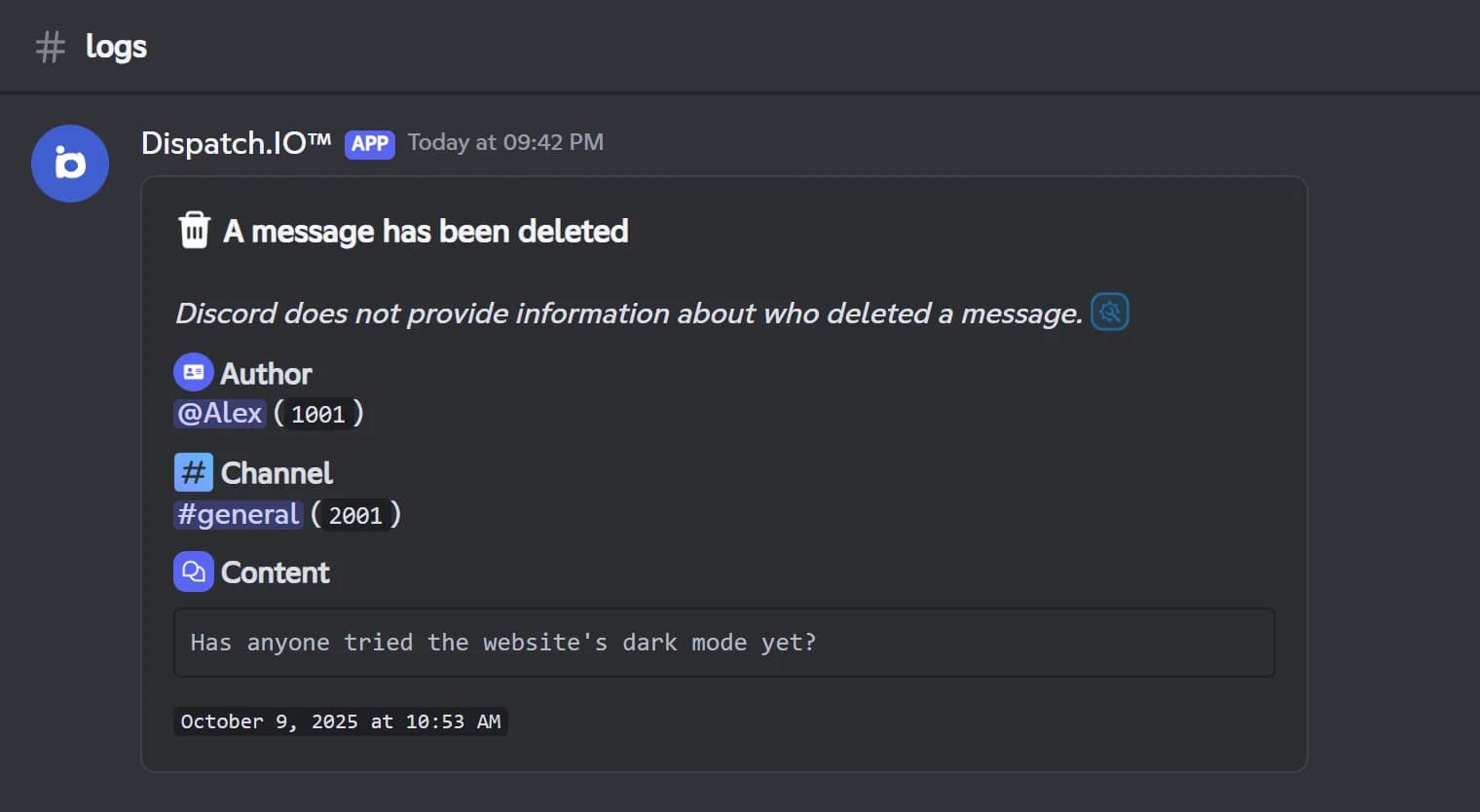
Dispatch.IO keeps a record of what happens on your server, with one channel per log type: messages, members, joins and leaves, voice, sanctions, anti-raid, invites, captcha, ticket transcripts and general server logs. A deleted message shows its author, channel, text and attachments; an edited one shows the before and after. Joins show the account's age, leaves show the roles the member had, and channel, role or server changes say who made them, read from Discord's audit log.
The bot also logs configuration changes made with /config or on the dashboard, which invite a member used, voice connections with the time spent in each channel, and every sanction. Critical logs (sanctions, anti-raid, deleted channel or role, server changes) ping your emergency roles, or the owner by default.
There is no switch to flip: a log is posted as soon as its channel is set. Logs are free with no plan limit. Pick your channels on the dashboard's Channels page, where the + button creates a private channel for you, or from Discord with /config.
What it does
One channel per log type
Messages, members, joins, voice, sanctions, anti-raid, invites, captcha and more, each in its own channel.
Deleted and edited messages
Author, channel, text and attachments for deletions, before and after for edits.
Who did what
Channel, role and server changes show who made them, read from the audit log.
Configuration changes
Every change made with /config or on the dashboard is logged with the old and new value.
Critical alerts
Sanctions and anti-raid actions ping your emergency roles or members, the owner by default.
Ready in 3 steps
- 1
Add Dispatch.IO
Invite the bot and give it the View Audit Log permission so logs can name who made each change.
- 2
Pick your channels
On the dashboard's Channels page or with /config, set a channel for each log type you want, or create a private one with +.
- 3
Follow everything
The bot posts every event in the right channel, in your server's language.
Main commands
FAQ
How do I see deleted messages on Discord?
Set a Message Logs channel: every deleted message is posted there with its author, channel, text and a link to each attachment. Discord does not say who deleted a message, so the log cannot show it. Messages sent before the bot's last restart are logged without their content.
How do I know who invited a member?
Set an Invite Link Logs channel and give the bot the Manage Server permission. On each join, the log shows who invited the member, with the code and its use count. It cannot tell for a vanity URL, a single-use invite or a join through server discovery.
How do I find out who deleted a channel?
The General Server Logs channel shows the channel's name, type, category and who deleted it, read from the audit log. The bot needs the View Audit Log permission, otherwise the author is shown as a system action. This log is critical, so it pings your emergency roles.
Are Dispatch.IO logs free?
Yes, every log channel works on the free plan. Only the DM copy of critical logs to your emergency contacts requires the Basic or Ultimate plan.
Discord logging bot
Dispatch.IO is a free Discord logging bot: deleted and edited messages, joins, sanctions and server changes. You always know who did what on your server.
Go further
Discord moderation bot
Warnings, timeouts, kicks and bans with a full infraction history and automatic filters.
Discord anti-raid bot
Captcha, raid mode and 14 automatic protections that sanction attackers and undo the damage.
Discord ticket bot
Ticket panels, private channels, claim and transcripts, handled from Discord or the dashboard.