
Discord moderation bot
Warnings, timeouts, kicks and bans with a full infraction history and automatic filters.

Dispatch.IO gives your staff the moderation commands they actually use: /warn, /timeout (up to 28 days), /kick, /ban (with optional deletion of the last 7 days of messages), /force-disconnect for voice channels, plus /end-timeout and /unban to lift a sanction. Before each one, the bot checks role hierarchy and protects the owner and your Admin and Modo staff roles. The member then gets a DM with the reason, a confirmation shows up in the channel and a log lands in your moderation logs channel.
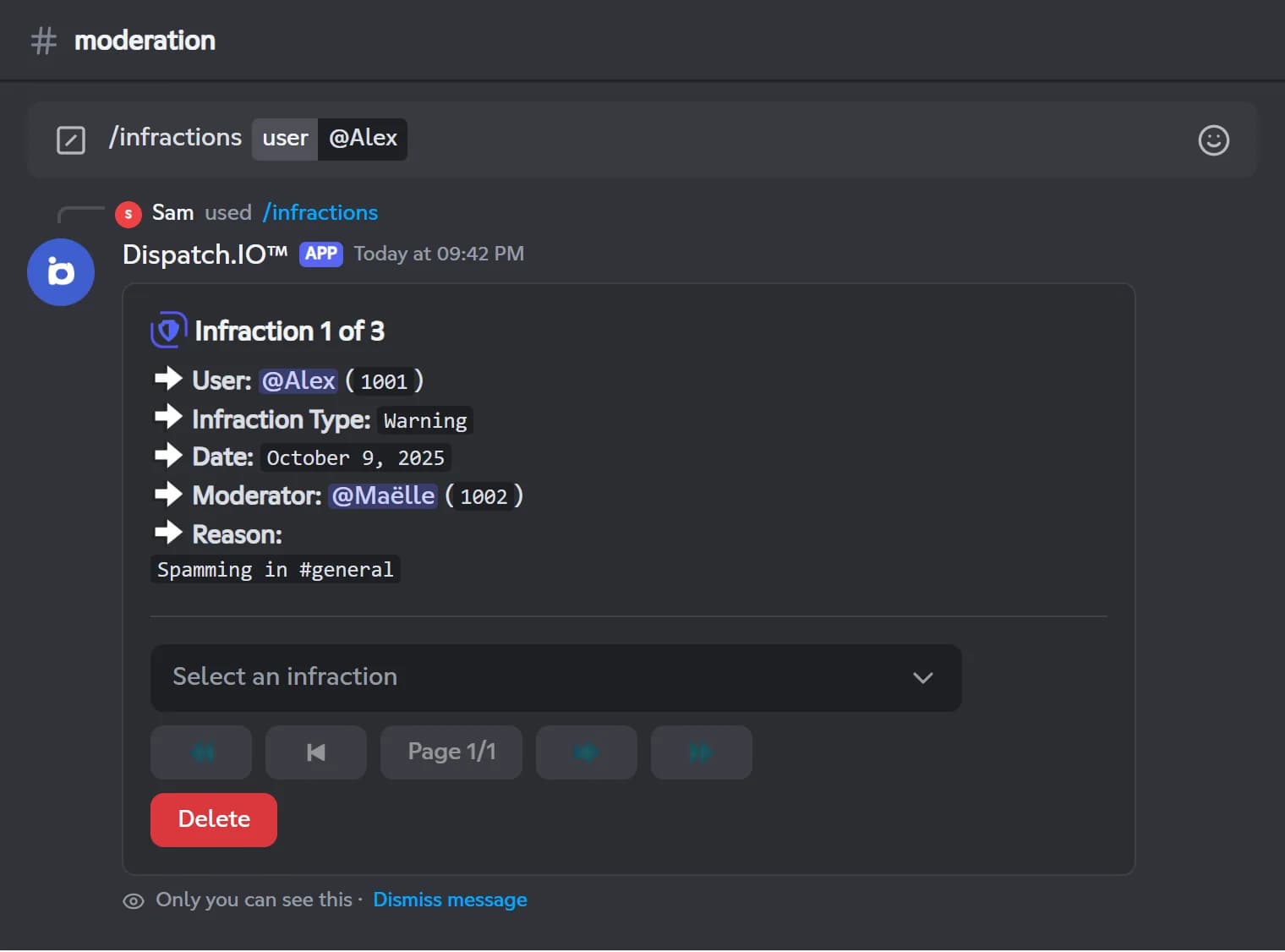
Every sanction is stored as an infraction in the member's history. /infractions lets you browse it, and the owner and administrators can delete an entry. Timeouts applied straight from Discord are recorded too, and tickets on the dashboard let you sanction their author without opening Discord.
For automod, the anti-raid filters remove spam, links outside allowed channels, mass mentions and forbidden words, even when letters are split by dots or swapped for digits. Everything is free and set up from Discord with /config or from the web dashboard.
What it does
Every sanction in one command
/warn, /timeout, /kick, /ban, /force-disconnect, with /end-timeout and /unban to undo them.
Infraction history
Each sanction is stored with its date, moderator and reason, and can be browsed with /infractions.
Hierarchy checks
The owner, the bot and members with a higher role cannot be targeted. Admin and Modo staff roles are protected too.
Member notified
The member gets a DM with the reason, before the sanction, so it still reaches them.
Sanction logs
Every sanction is posted in your moderation logs channel and can ping your emergency roles.
Automod filters
Spam, links, mass mentions and forbidden words are deleted and warned by the anti-raid filters.
Ready in 3 steps
- 1
Add Dispatch.IO
Invite the bot and place its role above the members you want to moderate.
- 2
Set up your logs
Pick a Moderation & Sanction Logs channel on the dashboard or with /config, and turn on the anti-raid filters you need.
- 3
Moderate
Your staff uses /warn, /timeout or /ban; every sanction is notified, logged and recorded.
Main commands
FAQ
How do I mute someone on Discord with a bot?
Run /timeout with the member, a duration such as 10m, 1h30m or 2d, and a reason. Durations use English units and cannot exceed 28 days. The member can no longer write, react or talk in voice until it ends, and /end-timeout lifts it early.
How do I see a member's warning history?
Run /infractions user:@member. You see each warning, timeout, kick, ban and voice disconnect with its date, moderator and reason. Viewing someone else's history requires the Timeout Members permission, while anyone can check their own.
Do warnings escalate to a timeout automatically?
Not with manual warnings: piling up /warn never triggers a timeout or ban automatically. Automatic sanctions come from the anti-raid filters, where the 3rd warning for links, mentions or forbidden words within the time window gives a 24-hour timeout.
Why does a moderation command not respond?
Either you or the bot is missing the required permission, so Discord shows that the application did not respond. Also check that the bot's highest role sits above the target's role for /timeout, /kick and /ban.
Discord moderation bot
Dispatch.IO is a free Discord moderation bot: warn, timeout, kick, ban, infraction history and automod filters. Your staff moderates faster, with a full record.
Go further
Discord anti-raid bot
Captcha, raid mode and 14 automatic protections that sanction attackers and undo the damage.
Discord logging bot
Deleted messages, joins, sanctions, server changes: every event in the right channel, with who did it.
Discord ticket bot
Ticket panels, private channels, claim and transcripts, handled from Discord or the dashboard.