
The moderation commands let you sanction a member (warning, timeout, kick, ban, voice disconnect), lift a sanction and look up a member's infraction history. This page is for the server's moderators and administrators.
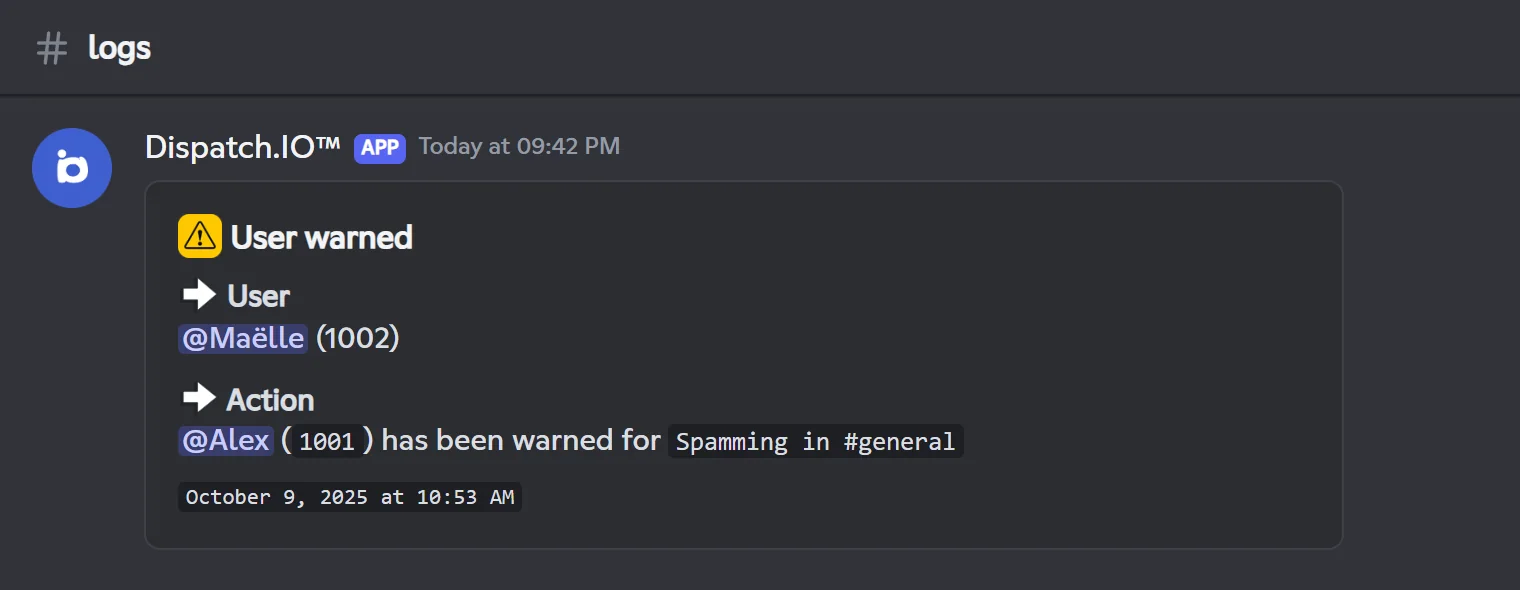
For every sanction, Dispatch.IO checks that you are allowed to target that member, sends them a direct message, posts a confirmation in the channel, publishes a log and records the infraction.
| Command | What it does | Required Discord permission |
|---|---|---|
/warn | Warn a member | Timeout Members |
/timeout | Mute a member for a set time (timeout) | Timeout Members |
/end-timeout | Lift a timeout early | Timeout Members |
/kick | Kick a member from the server | Kick, Accept, and Deny Members |
/ban | Ban a user from the server | Ban Members |
/unban | Unban a user | Ban Members |
/force-disconnect | Disconnect a member from a voice channel | Timeout Members |
/infractions | View (and delete) a member's infractions | None for your own infractions |
/snipe | Find a member's deleted messages in the logs | Timeout Members |
Command names
The cards use the base names of commands and options (/warn user:), which is also what Discord shows in English. With Discord set to French, several commands are translated (/avertir utilisateur: raison:): each card gives the French name.
Before you start
Required permissions
For you. Each command needs a Discord permission (listed on its card). Discord also hides these commands from members who don't have that permission; you can change this in Server Settings → Integrations → Dispatch.IO.
For the bot. Dispatch.IO needs the same permission as you, plus its basic server permissions: View Channel, Send Messages, Embed Links, Read Message History, Add Reactions, Use External Emojis and Manage Messages. For /timeout, /kick and /ban, the bot's highest role must also sit above the target member's highest role.
No reply = a permission is missing
If you or the bot lack the required permission, the command doesn't reply at all: Discord just shows "The application did not respond". Check the permissions first (yours and the bot's role).
Dispatch.IO's Admin and Mod roles
On top of Discord permissions, Dispatch.IO recognises two types of staff roles registered for your server: Admin and Mod (ADMIN and MODO). A member with one of these roles can use /warn, /timeout, /end-timeout, /kick, /ban, /unban, /force-disconnect and /snipe even without the matching Discord permission (allow them to see these commands in Server Settings → Integrations). These roles also protect the members who hold them: see Who can sanction whom.
Note
These roles can't be set from the dashboard or with /config yet. If your server has none, only Discord permissions and the role hierarchy apply. More in Permissions and roles.
The sanction log channel
To keep a record of every sanction, pick a channel for Moderation & Sanction Logs on the dashboard's Channels page (see Channels) or with /config. Without it, sanctions still work, but no log is posted.
Tip
Use a regular text channel that only staff can see: logs are not sent to announcement channels.
Which language does the bot use?
| Message | Language |
|---|---|
| Confirmation and error messages in the channel | Your Discord app's language (French or English; English for any other language) |
| Direct message received by the sanctioned member | The server language, set in the dashboard |
| Log in the log channel | The server language |
Who can sanction whom
Before applying a sanction, Dispatch.IO checks the target. If a rule blocks it, the bot replies with an explanation (for example "Only the owner or an administrator can warn a moderator.") and nothing is applied or recorded.
| Rule | /warn | /timeout | /end-timeout | /kick | /ban | /unban | /force-disconnect |
|---|---|---|---|---|---|---|---|
| The server owner can't be targeted | — | ✔ | — | ✔ | ✔ | ✔ | — |
| The member must be in the server | ✔ | ✔ | ✔ | ✔ | — | must be banned | ✔ |
| Your highest role must be above theirs | — | ✔ | — | ✔ | ✔ | — | — |
| The bot's highest role must be above theirs | — | ✔ | — | ✔ | ✔ | — | — |
| A member with the Admin role can only be targeted by the owner | ✔ | ✔ | ✔ | ✔ | ✔ | — | ✔ |
| A member with the Mod role can only be targeted by the owner or an Admin | ✔ | ✔ | ✔ | ✔ | ✔ | — | ✔ |
✔ = the rule applies · — = not checked for this command.
A few details:
- The bot itself can never be targeted: it answers with a little joke.
- Role hierarchy: the check compares each person's highest role and applies to everyone, the owner included. A role equal to yours blocks the sanction too.
/ban: a member with the Discord Administrator permission counts as an Admin (only the owner can ban them), and a moderator with that permission can ban a Mod./banalso accepts a user who is not (or no longer) in the server: only the "owner" and "bot" rules apply then./timeout: a member with the Discord Administrator permission can never be timed out (Discord forbids it), not even by the owner./unbandoesn't check roles at all: the user just has to be banned.
What happens after a sanction
Once a sanction passes every check, here is what Dispatch.IO does:
- The infraction is recorded in the member's history (see Viewing infractions).
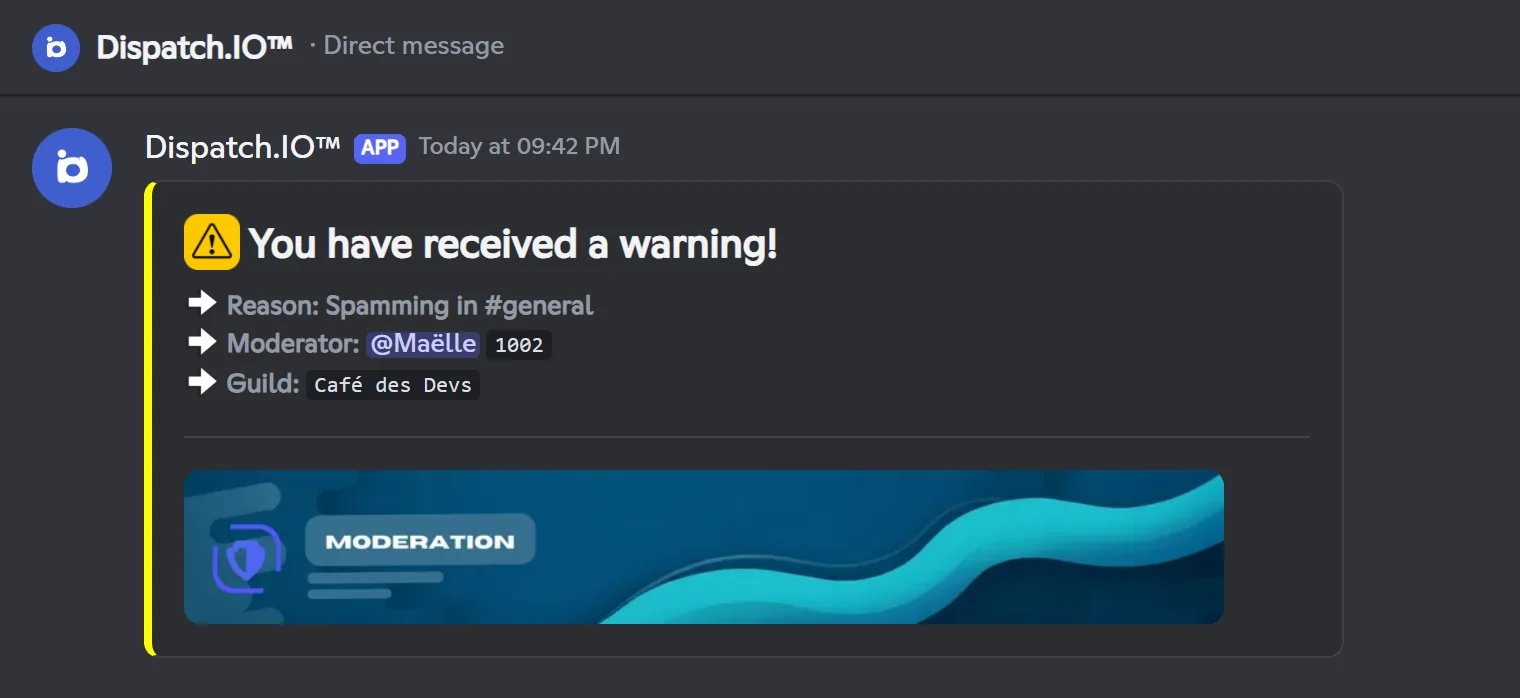
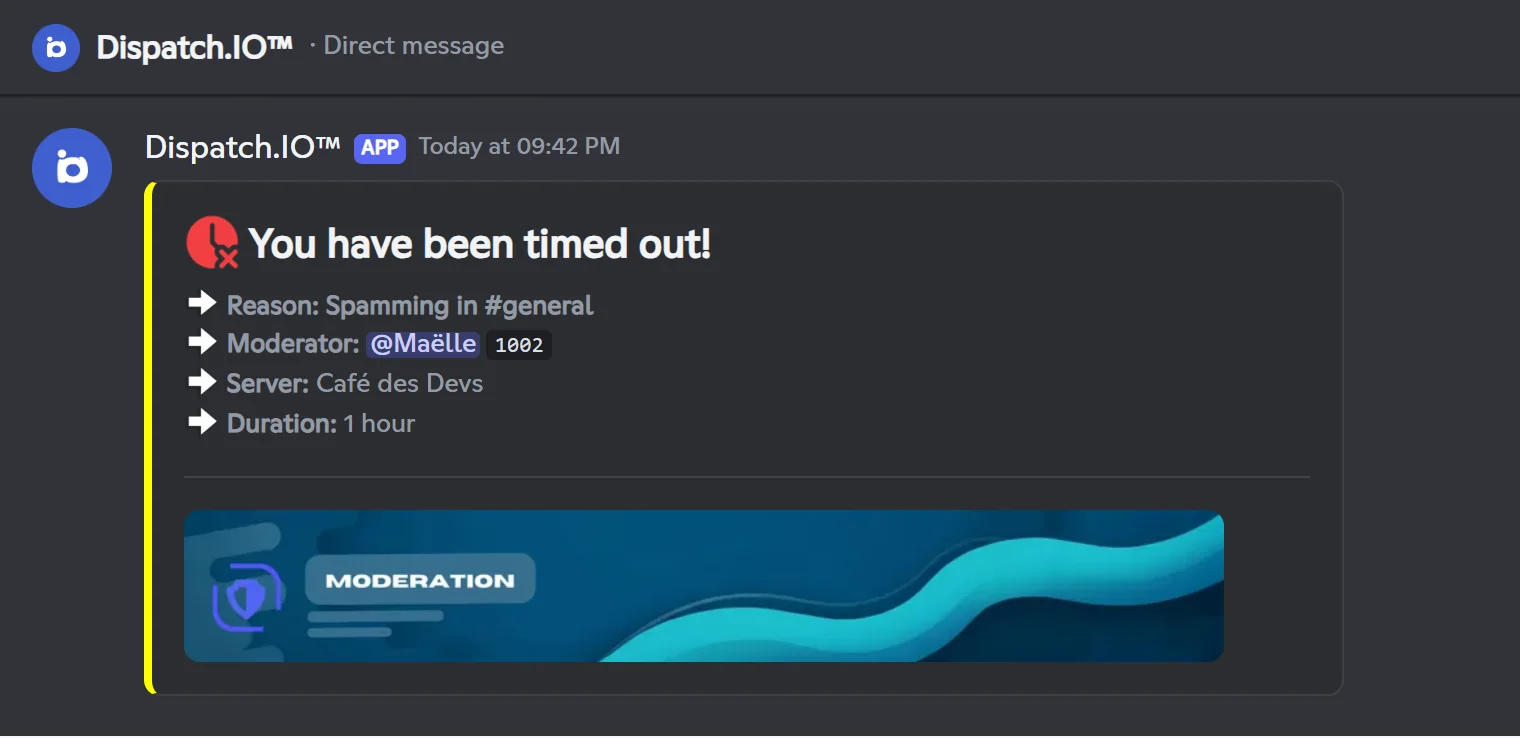
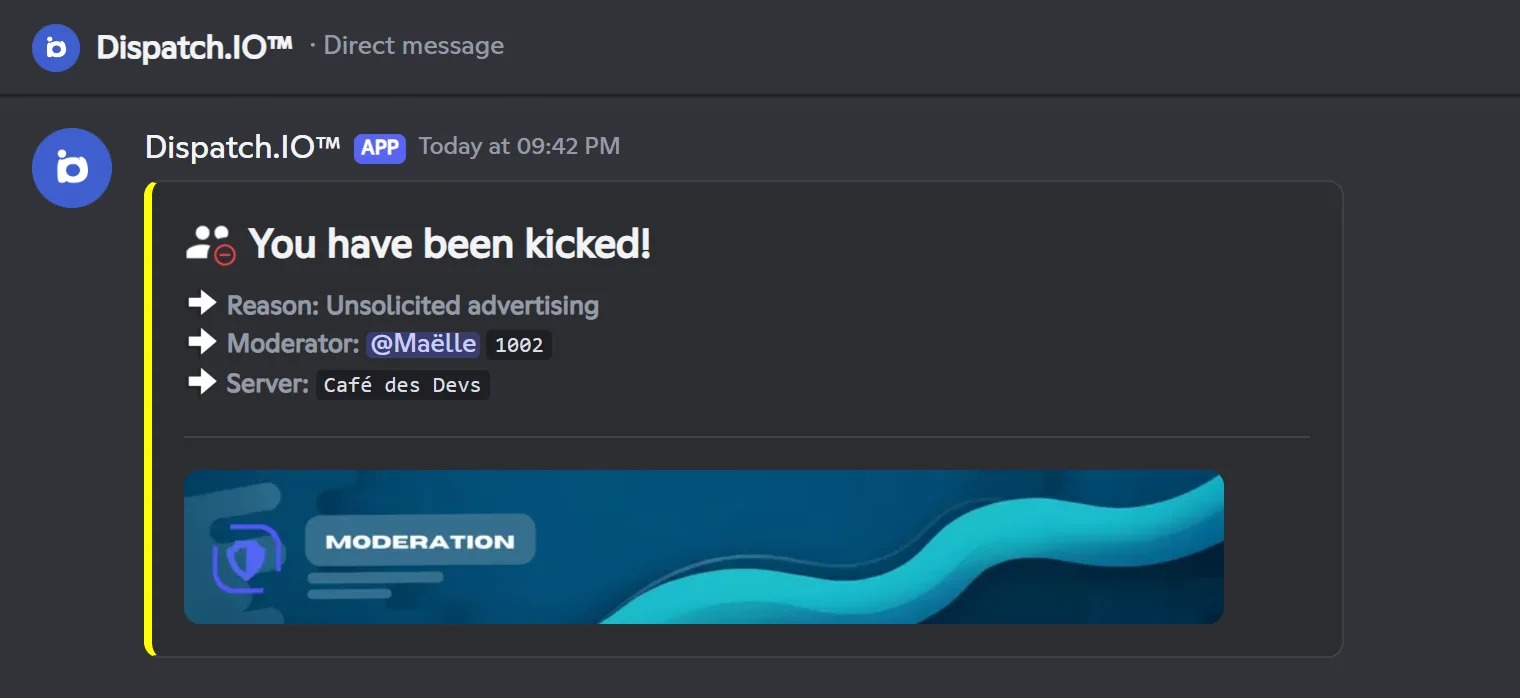
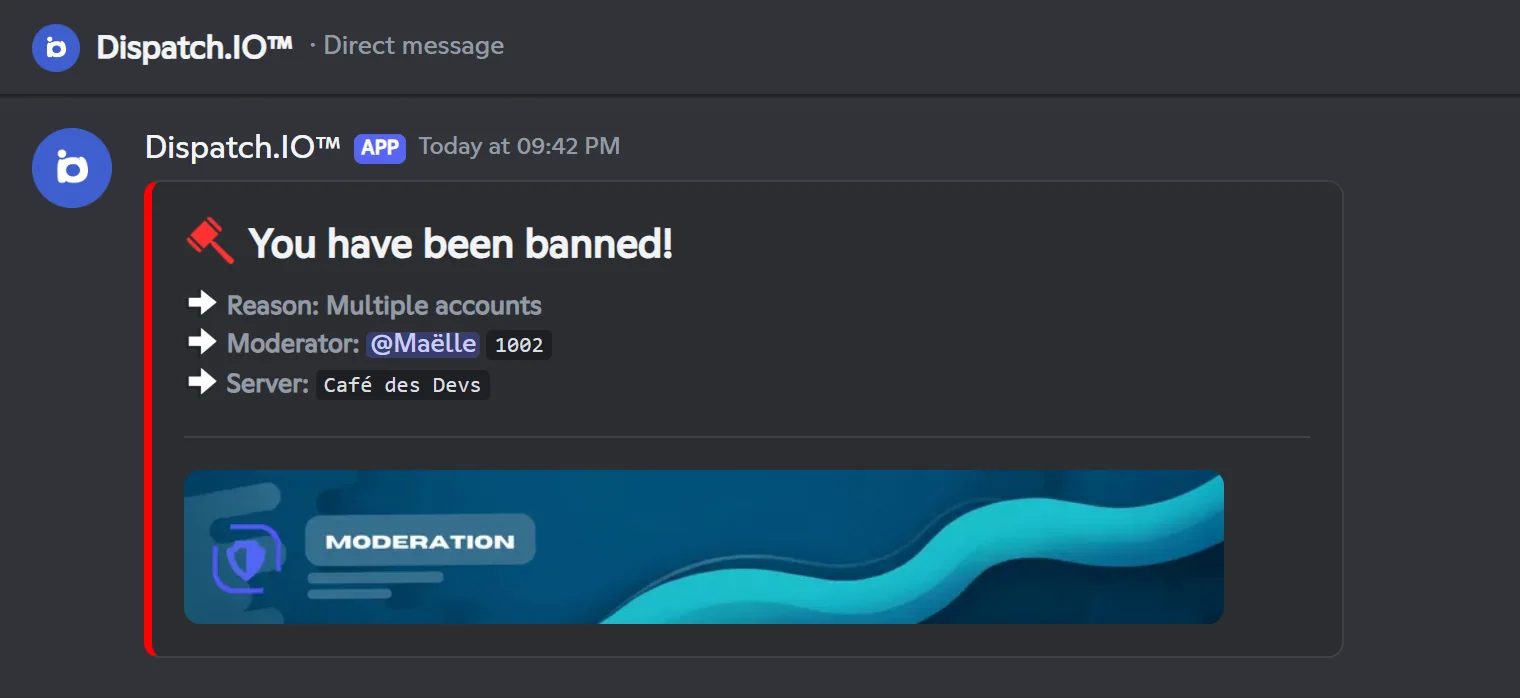
- The member gets a direct message with the sanction, the reason, the moderator and the server name, plus the moderation banner. For
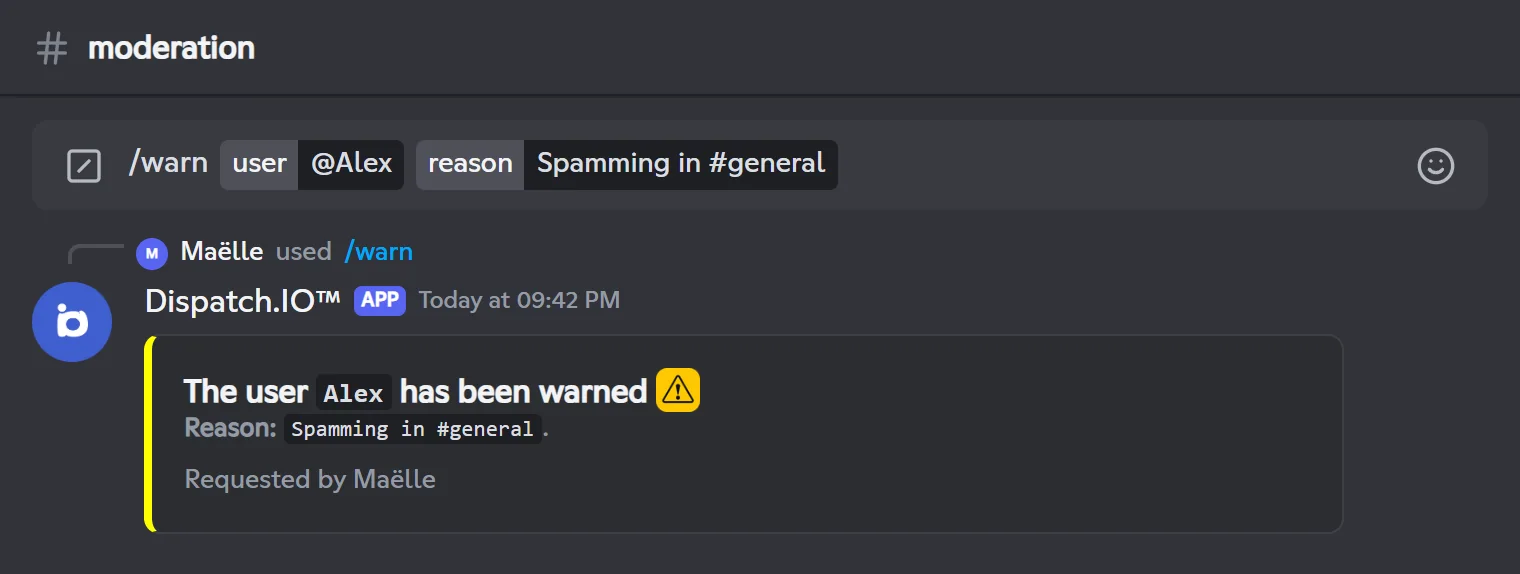
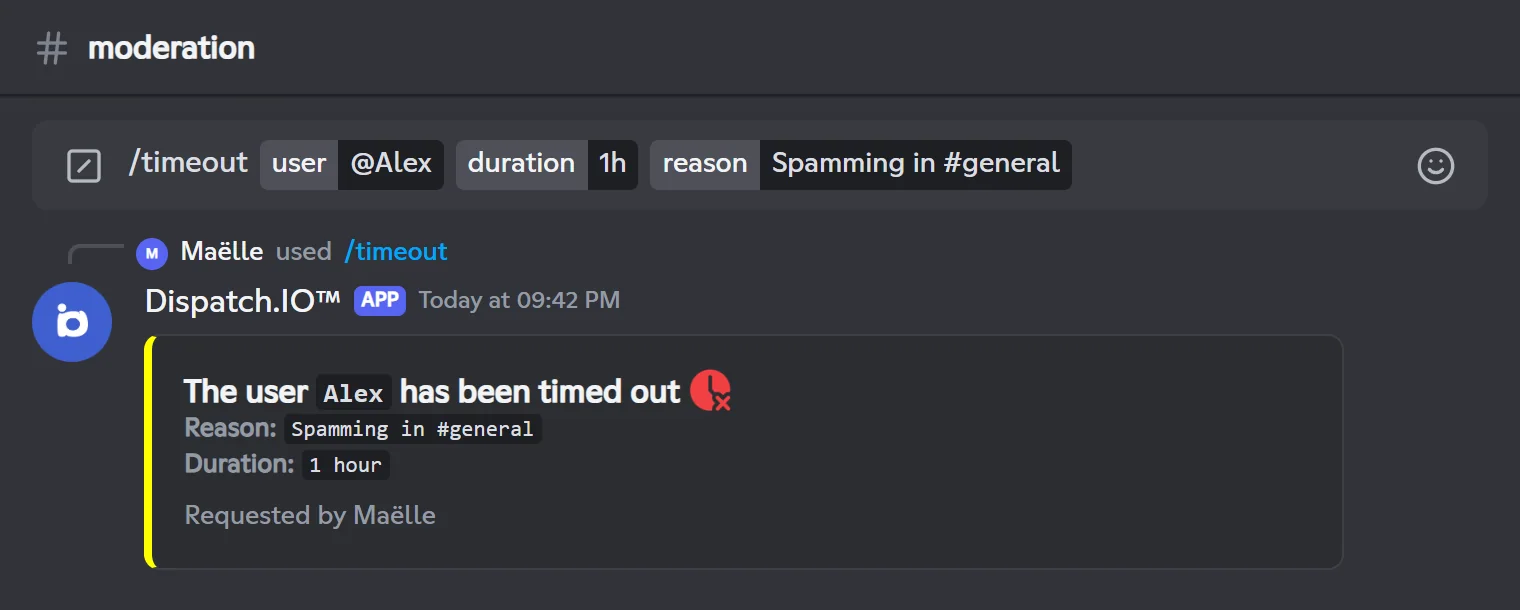
/warn,/timeout,/kickand/ban, this message is sent before the sanction so the member can still receive it. If the member has closed their DMs, nothing is sent and the sanction still applies. - The confirmation appears publicly in the channel where you ran the command, with "Requested by" and your name.
- A log is posted in the Moderation & Sanction Logs channel: sanction type, moderator (mention and ID), target member and reason, with the date.
Getting notified about sanctions
Sanction logs are treated as critical. If you turn on Emergency Mentions & Alerts in the server's basic configuration (dashboard), the chosen roles or members are mentioned in every sanction log (the owner if nobody is chosen). With Dispatch.IO Basic or Ultimate, the Direct Message (DM) Copy option also sends the log by DM to the chosen members (or to the owner).
Note
There is no automatic escalation: piling up warnings doesn't trigger a timeout or a ban. Automatic sanctions belong to the Anti-raid and security module.
Warning a member
/warn records a warning in the member's infractions and lets them know by direct message. The member stays in the server and can keep chatting.
/warnWarns a member and records the warning in their infractions.
Syntax
/warn user:<member> reason:<reason>Options
| Option | Type | Required | Description |
|---|---|---|---|
user | User | Yes | The member to warn. They must be in the server. |
reason | Text | Yes | The reason, shown in the confirmation, the direct message and the log. |
Member permission
Timeout Members
Bot permission
Timeout Members + basic permissions
Where to use it
Server only
Rate limit
3 uses every 10 seconds
Plan
Free (included in every plan)
Examples
/warn user:@Alex reason:Spamming in #general/warn user:@Alex reason:Insulting another member
In Discord set to French: /avertir utilisateur: raison:
Public reply in the channel. The member gets a direct message and the sanction is logged in Moderation & Sanction Logs.
Result on Discord
Result on Discord
Timing out a member
/timeout mutes a member for a set time (Discord's "Timeout" feature): they can't write, react or speak in voice until the timeout ends.
Writing the duration
Write the duration as a number followed by a unit. You can combine several values: they add up.
| Unit | Meaning | Examples |
|---|---|---|
s, sec, seconds | seconds | 30s |
m, min, minutes | minutes | 10m, 1h30m |
h, hr, hours | hours | 2h, 1.5h |
d, day, days | days | 3d |
w, week, weeks | weeks | 2w |
Warning
The maximum is 28 days. Only English units are recognised (2d, not the French 2j), and m means minutes. An invalid duration shows "Invalid duration. Please use a format like 3s, 5m, 1h, 2d (max 28 days)."
/timeoutTimes out a member for the chosen duration and records the infraction.
Syntax
/timeout user:<member> duration:<duration> reason:<reason>Options
| Option | Type | Required | Description |
|---|---|---|---|
user | User | Yes | The member to time out. They must be in the server. |
duration | Text | Yes | The duration, for example 10m, 1h, 1h30m or 2d (28 days max). |
reason | Text | Yes | The reason, shown in the confirmation, the direct message and the log. |
Member permission
Timeout Members
Bot permission
Timeout Members + basic permissions
Where to use it
Server only
Rate limit
3 uses every 10 seconds
Plan
Free (included in every plan)
Examples
/timeout user:@Alex duration:1h reason:Spamming in #general/timeout user:@Alex duration:1h30m reason:Repeated provocations
In Discord set to French: /exclure utilisateur: durée: raison:
The duration is stored with the infraction and the member is removed from the anti-raid whitelist. A timeout applied directly in Discord is recorded too, if the bot can see the server's audit log.
Result on Discord
Result on Discord
Lifting a timeout
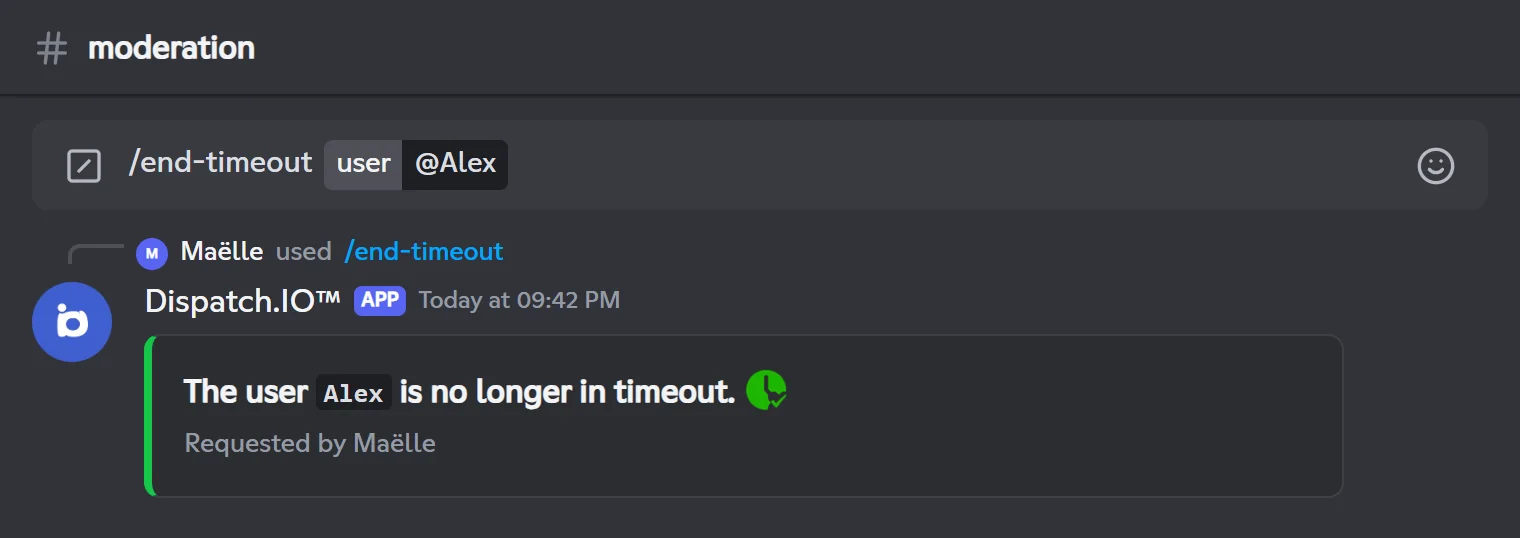
/end-timeout removes a member's timeout before it ends. The current timeout is closed in their infractions: its duration becomes the time that actually passed, and "(Cancelled by your username)" is added to the reason.
/end-timeoutRemoves a member's timeout and closes the matching infraction.
Syntax
/end-timeout user:<member>Options
| Option | Type | Required | Description |
|---|---|---|---|
user | User | Yes | The member whose timeout you want to lift. They must be in the server and timed out. |
Member permission
Timeout Members
Bot permission
Timeout Members + basic permissions
Where to use it
Server only
Rate limit
3 uses every 10 seconds
Plan
Free (included in every plan)
Examples
/end-timeout user:@Alex
In Discord set to French: /fin-exclure utilisateur:
If the member is not timed out, the bot replies "This user is not in timeout.". The member gets a "Your timeout has been lifted!" direct message (without a reason) and the action is logged.
Result on Discord
Kicking a member
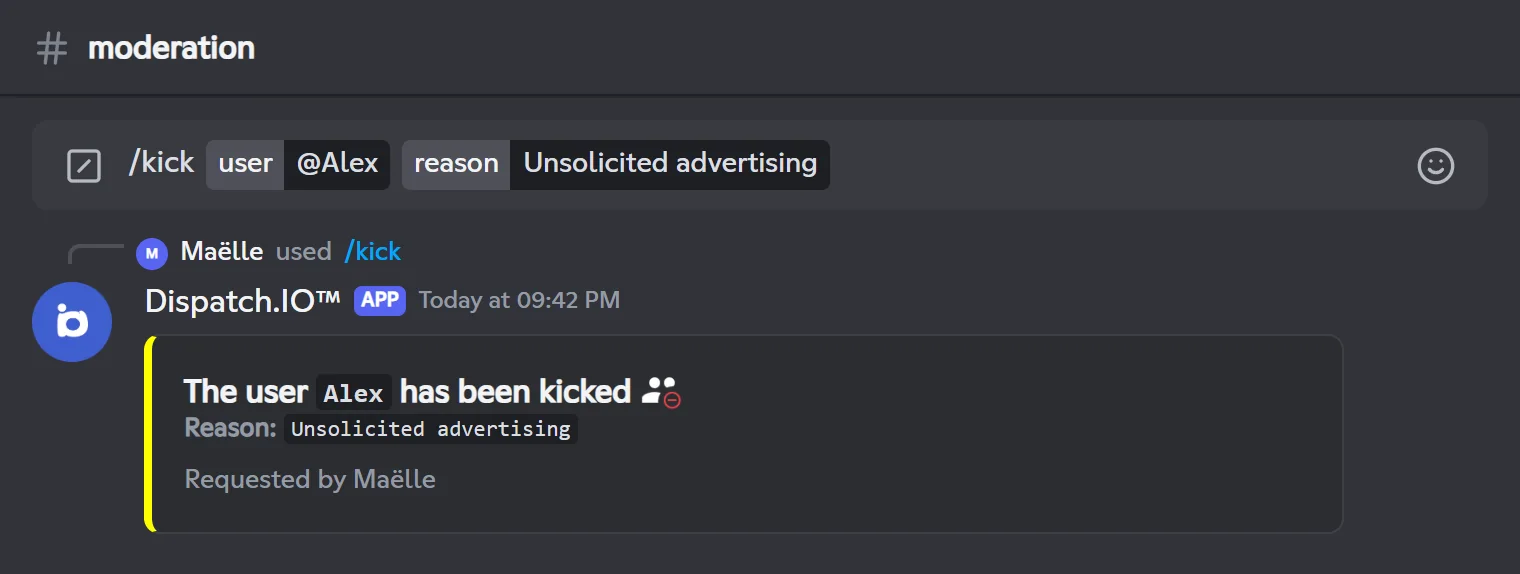
/kick removes a member from the server. Unlike a ban, they can come back with a new invite.
/kickKicks a member from the server and records the kick in their infractions.
Syntax
/kick user:<member> reason:<reason>Options
| Option | Type | Required | Description |
|---|---|---|---|
user | User | Yes | The member to kick. They must be in the server. |
reason | Text | Yes | The reason, shown in the confirmation, the direct message and the log. |
Member permission
Kick, Accept, and Deny Members
Bot permission
Kick, Accept, and Deny Members + basic permissions
Where to use it
Server only
Rate limit
3 uses every 10 seconds
Plan
Free (included in every plan)
Examples
/kick user:@Alex reason:Unsolicited advertising
In Discord set to French: /expulser utilisateur: raison:
The member gets the direct message before being kicked. They are also removed from the server's anti-raid whitelist.
Result on Discord
Result on Discord
Banning a user
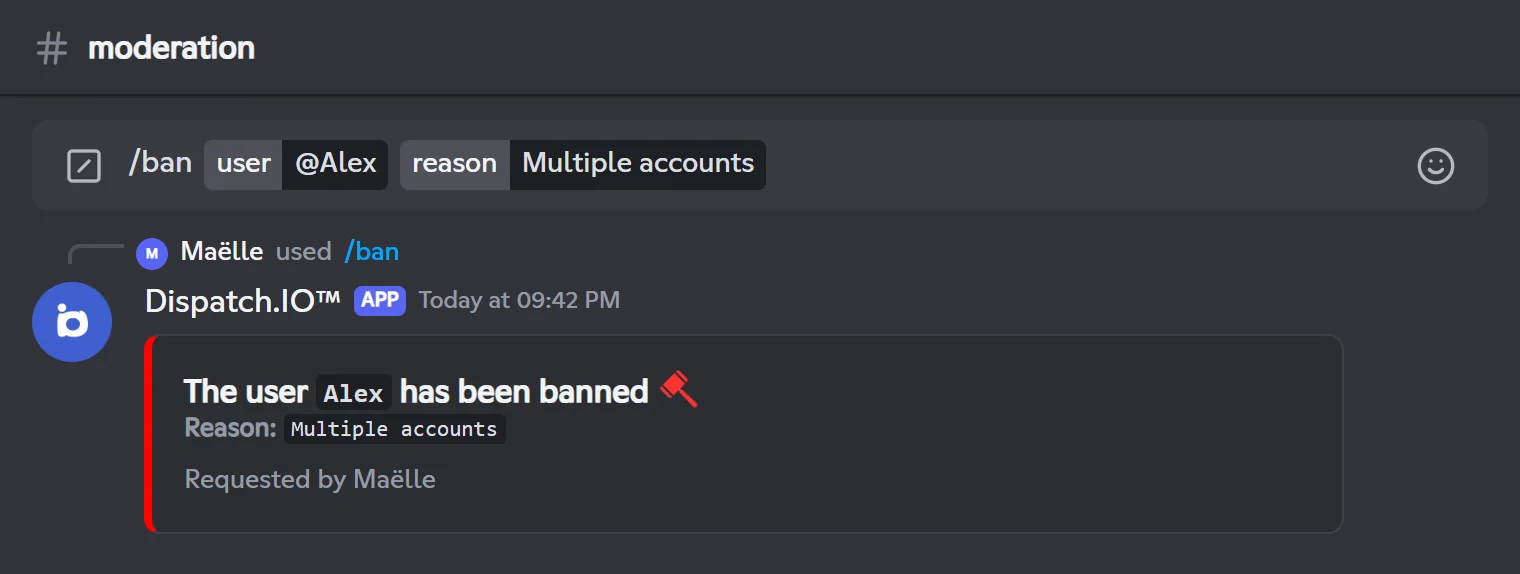
/ban bans a user: they are removed and can't come back until they are unbanned. You can also delete their messages from the last 7 days.
/banBans a user from the server and records the ban in their infractions.
Syntax
/ban user:<user> reason:<reason> [delete_messages:<true/false>]Options
| Option | Type | Required | Description |
|---|---|---|---|
user | User | Yes | The user to ban. They don't have to be in the server (you can paste their ID). |
reason | Text | Yes | The reason, shown in the confirmation, the direct message and the log. |
delete_messages | Boolean (true/false) | No | Delete their messages from the last 7 days. Default: no. |
Member permission
Ban Members
Bot permission
Ban Members + basic permissions
Where to use it
Server only
Rate limit
3 uses every 10 seconds
Plan
Free (included in every plan)
Examples
/ban user:@Alex reason:Hate message raid delete_messages:True/ban user:@Alex reason:Multiple accounts
In Discord set to French: /ban utilisateur: raison: supprimer_messages:
If the user is already banned, the bot replies with the reason of the existing ban. The member is also removed from the anti-raid whitelist.
Result on Discord
Result on Discord
Unbanning a user
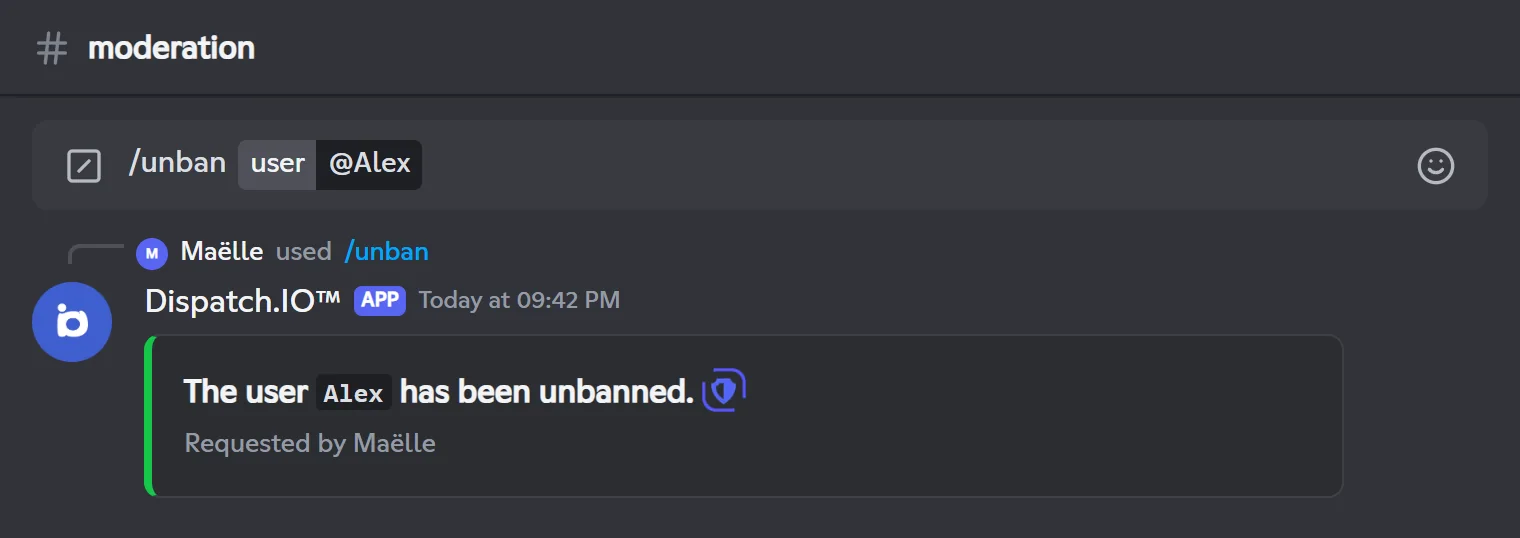
/unban lifts a user's ban. The latest active ban is closed in their infractions: its duration becomes the real length of the ban, and "(Unbanned by your username)" is added to the reason.
/unbanUnbans a user and closes their ban in their infractions.
Syntax
/unban user:<user>Options
| Option | Type | Required | Description |
|---|---|---|---|
user | User | Yes | The user to unban. Since they are no longer in the server, paste their Discord ID. |
Member permission
Ban Members
Bot permission
Ban Members + basic permissions
Where to use it
Server only
Rate limit
3 uses every 10 seconds
Plan
Free (included in every plan)
Examples
/unban user:1001
In Discord set to French: /unban utilisateur:
If the user isn't banned, the bot replies "This user is not banned from the server.". The unban direct message only arrives if the user still shares another server with Dispatch.IO.
Result on Discord
Finding a user's ID
Turn on Developer Mode (User Settings → Advanced), then right-click the user → Copy User ID. For a banned user, you can also find it in Server Settings → Bans.
Disconnecting a member from voice
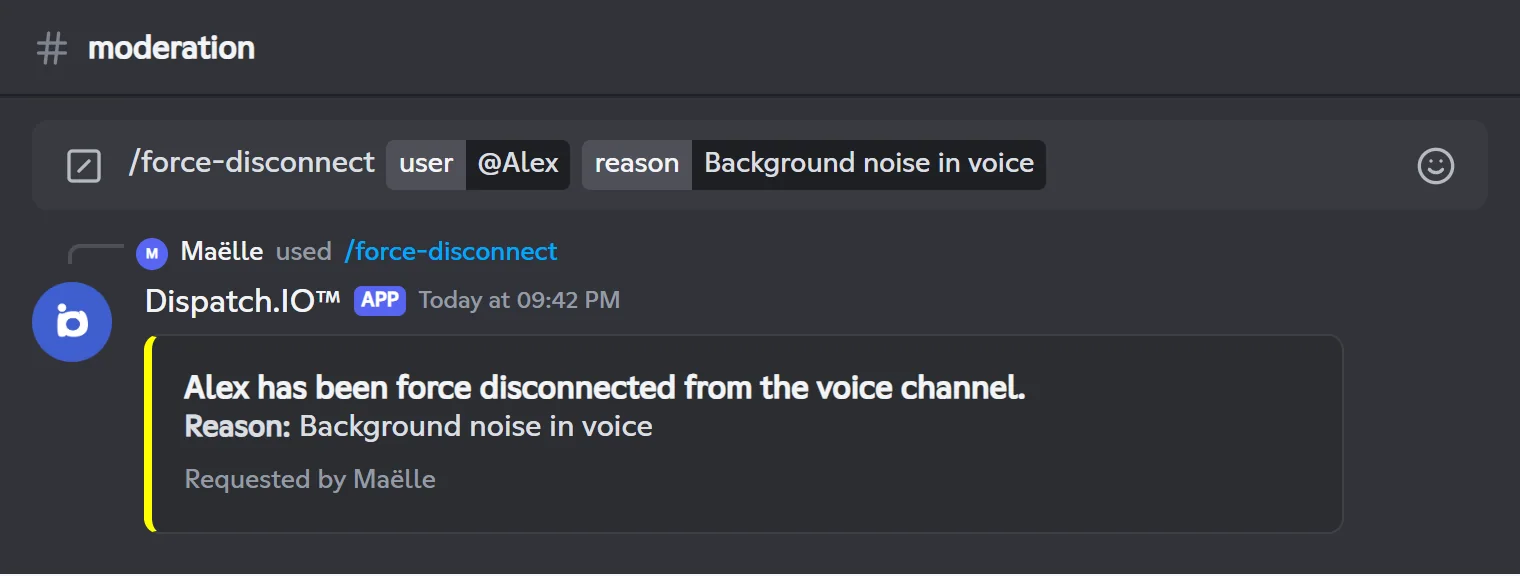
/force-disconnect removes a member from the voice channel they're in. They stay in the server and can reconnect: handy to cut short disruptive behaviour in voice.
/force-disconnectDisconnects a member from their voice channel and records a "Vocal disconnect" infraction.
Syntax
/force-disconnect user:<member> reason:<reason>Options
| Option | Type | Required | Description |
|---|---|---|---|
user | User | Yes | The member to disconnect. They must be in the server and in a voice channel. |
reason | Text | Yes | The reason, shown in the confirmation, the direct message and the log. |
Member permission
Timeout Members
Bot permission
Timeout Members + Move Members + basic permissions
Where to use it
Server only
Rate limit
3 uses every 10 seconds
Plan
Free (included in every plan)
Examples
/force-disconnect user:@Alex reason:Background noise in voice
In Discord set to French: /forcer-déconnexion utilisateur: raison:
Without the Move Members permission, the bot can't disconnect the member and shows a generic error message. If the member isn't in voice, it replies "This user is not currently in a voice channel.".
Result on Discord
Viewing and deleting infractions
Every sanction is recorded as an infraction in the member's history, specific to your server. /infractions lets you browse them and lets the owner and administrators delete them.
What is recorded
An infraction holds: the member, the sanction type, the date, the moderator, the reason and, for a timeout or a lifted ban, the duration.
| Type shown | Created by |
|---|---|
| Warning | /warn |
| Timeout | /timeout, or a timeout applied directly in Discord |
| Kick | /kick |
| Ban | /ban (closed by /unban) |
| Vocal disconnect | /force-disconnect |
| Timeout 1h, Timeout 24h, Timeout 3d, Timeout 7d | Automatic anti-raid sanctions |
Sanctions applied from a ticket in the dashboard (see Tickets) follow the same rules and are recorded the same way.
Viewing
- Your own infractions: run
/infractionswith no option. Anyone can do this. - Another member's infractions:
/infractions user:@member. You need the Timeout Members permission (or an Admin/Mod role); otherwise the bot replies "You lack the required permission: Timeout Members.".
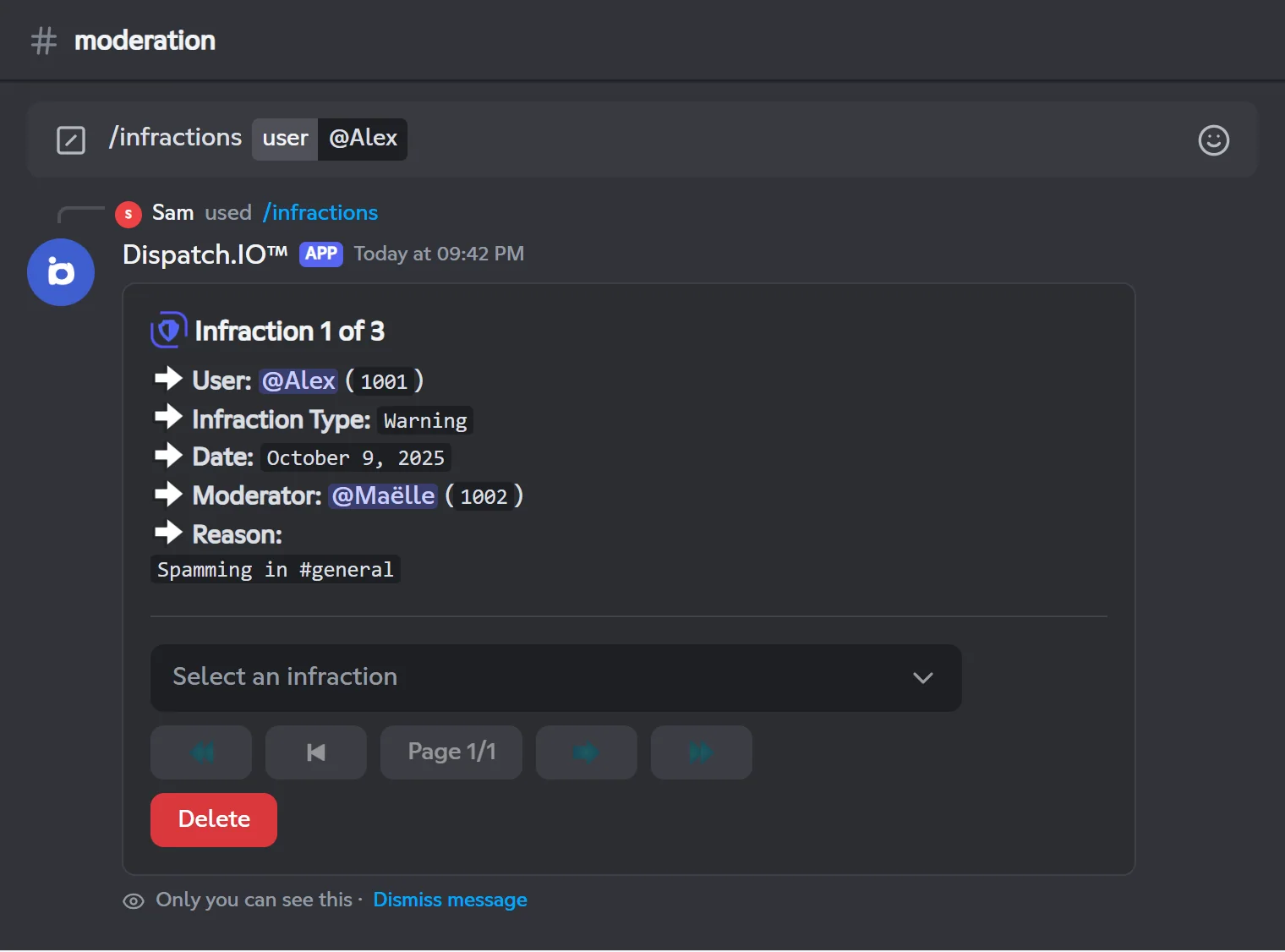
Only you can see the reply. It first shows the oldest infraction ("Infraction 1 of 3"), then a drop-down menu lists the others: pick one to display it. The menu stays usable for 60 seconds after your last action, and only you can use it.
/infractionsShows a member's infractions, or yours, one at a time.
Syntax
/infractions [user:<member>]Options
| Option | Type | Required | Description |
|---|---|---|---|
user | User | No | The member whose infractions you want to see. Without it: yours. |
Member permission
None for your own infractions; Timeout Members for another member's
Bot permission
No specific permission
Where to use it
Server only
Rate limit
1 use every 10 seconds
Plan
Free (included in every plan)
Examples
/infractions/infractions user:@Alex
Only you can see the reply. If the member has no infractions, the bot replies "No infractions found for @member.".
Result on Discord
Deleting an infraction
The Delete button only appears for the server owner and members with the Discord Administrator permission.
- Display the infraction to delete with
/infractions user:@memberand the menu. - Click Delete.
- Confirm with Confirm within 15 seconds (or Cancel).
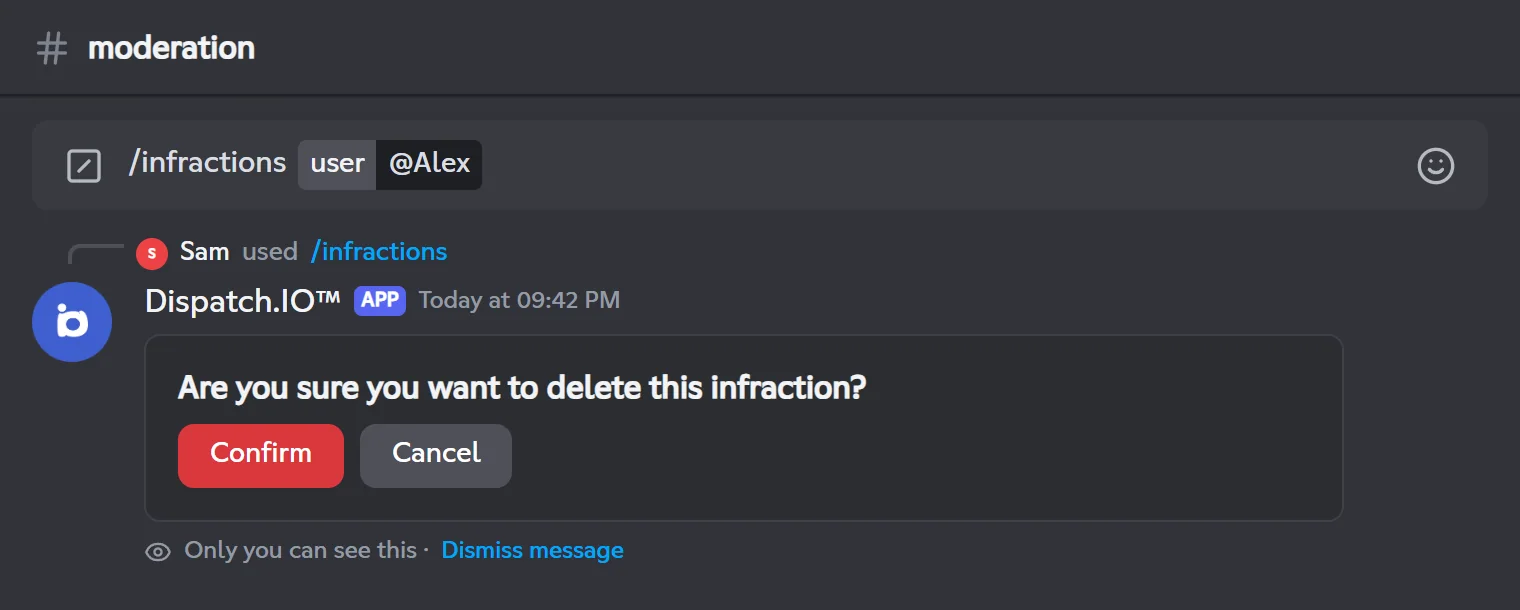
Deletion is permanent. It is logged in the Member & Profile Logs channel with the member, the original moderator, the sanction type and the reason.
Note
Deleting an infraction doesn't lift the sanction on Discord: use /end-timeout or /unban for that.
Finding deleted messages
/snipe looks through the Message Logs channel for a member's deleted messages and shows them, 5 per page. You need to have picked that channel in the dashboard (Channels page), and the bot must be able to read its history.
/snipeSearches the message log channel for a member's deleted messages.
Syntax
/snipe user:<member>Options
| Option | Type | Required | Description |
|---|---|---|---|
user | User | Yes | The member whose deleted messages you want to see. |
Member permission
Timeout Members
Bot permission
View Channel and Read Message History in the Message Logs channel
Where to use it
Server only
Rate limit
1 use every 30 seconds
Plan
Free (included in every plan)
Examples
/snipe user:@Alex
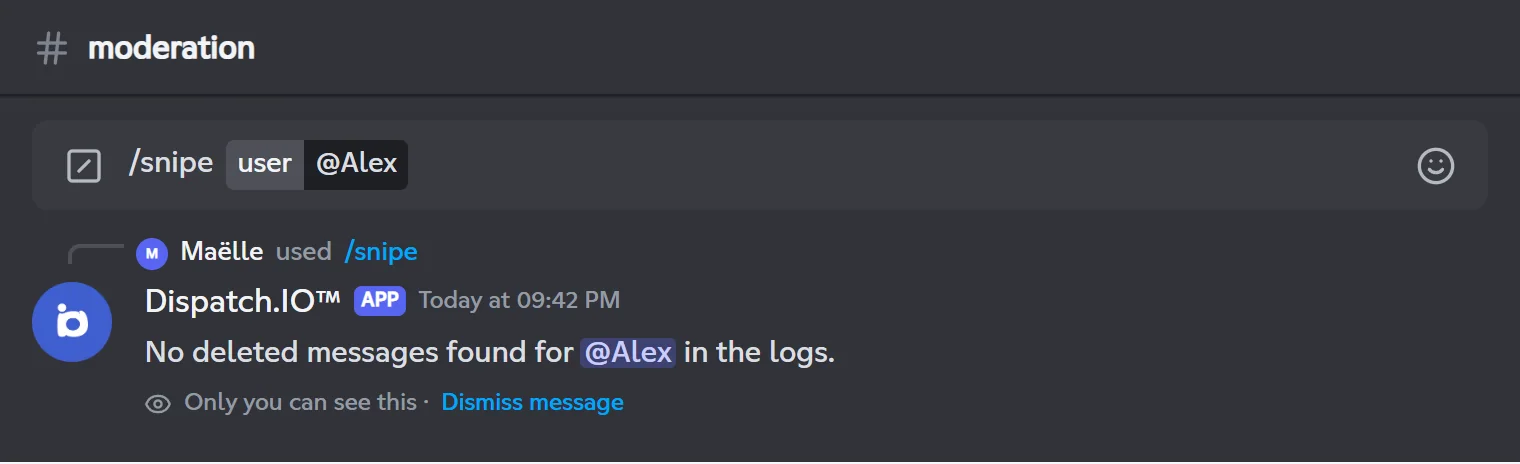
Only you can see the reply. Only the last 100 messages of the log channel are searched. Each use is logged in General Server Logs.
Result on Discord
Limited results for now
/snipe doesn't recognise the current format of deleted-message logs. So it usually replies "No deleted messages found for @member in the logs.", even when messages were logged. In the meantime, check the Message Logs channel directly.
Possible error messages:
| Message | What to do |
|---|---|
| No log channel for messages is configured for this server. | Pick a Message Logs channel on the dashboard's Channels page. |
| The configured log channel is invalid or inaccessible. | The channel was deleted or isn't a text channel: pick another one. |
| I don't have permission to read message history in the log channel. | Give the bot View Channel and Read Message History in that channel. |
Troubleshooting
| What you see | Explanation and fix |
|---|---|
| "The application did not respond" | You or the bot lack the required permission. Check the permission on the card and the bot's basic permissions. |
| "You cannot … a member with a role higher (than) or equal to yours." | Your highest role must be strictly above the target member's. |
| "I cannot … this member because their role is higher (than) or equal to mine." | Move the bot's role above the roles of the members you moderate (Server Settings → Roles). |
| "Only the server owner …" / "Only the owner or an administrator …" | The member has a Dispatch.IO Admin or Mod role: see Who can sanction whom. |
| "… because they are not in the server." | The member left the server. Only /ban works on a user who isn't there. |
| "Invalid duration. Please use a format like 3s, 5m, 1h, 2d (max 28 days)." | Use English units and 28 days at most. |
| No log shows up | Pick a text channel for Moderation & Sanction Logs and check that the bot can post in it. |
| "Oh no, it seems there’s a problem..." | Unexpected error: join support with the Contact Support button and the attached .log file. |
For other issues, see the Troubleshooting page.
Related pages
- Permissions and roles: the bot's permissions and the roles it recognises.
- Logs: every log channel and what it receives.
- Channels: choose the log channels from the dashboard.
- Anti-raid and security: automatic sanctions.
- All commands: the full command list.