
The Channels page brings together the 20 channels that Dispatch.IO may need: the welcome channel, the level-up channel, the log channels (audit logs)... For each one, you choose an existing channel on your server or have it created automatically by the bot, with the correct permissions.
It is intended for administrators who are installing the bot or reorganizing their channels. Open it from the Configuration > Channels menu or the Channels tile on the server home page.
Page overview
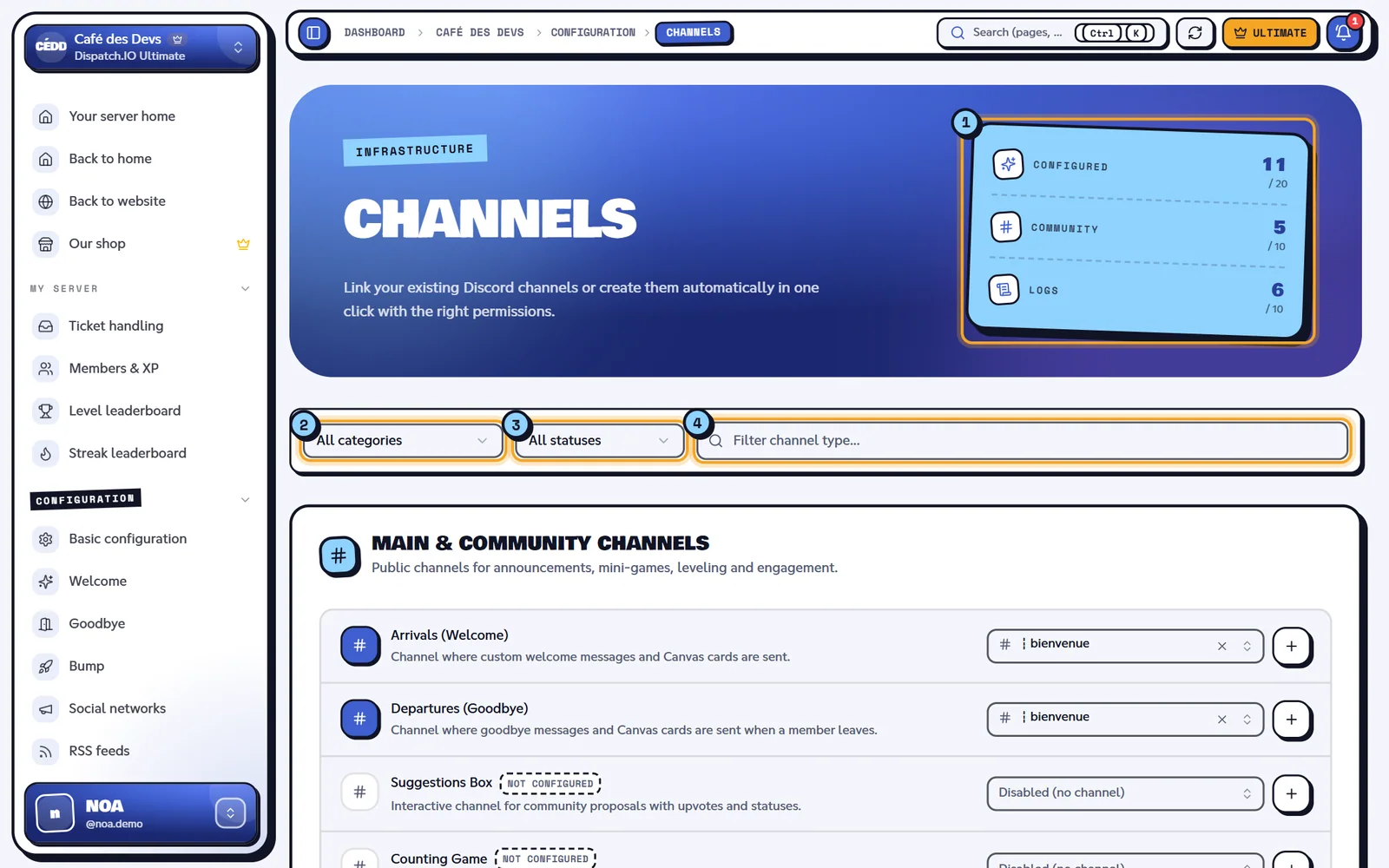
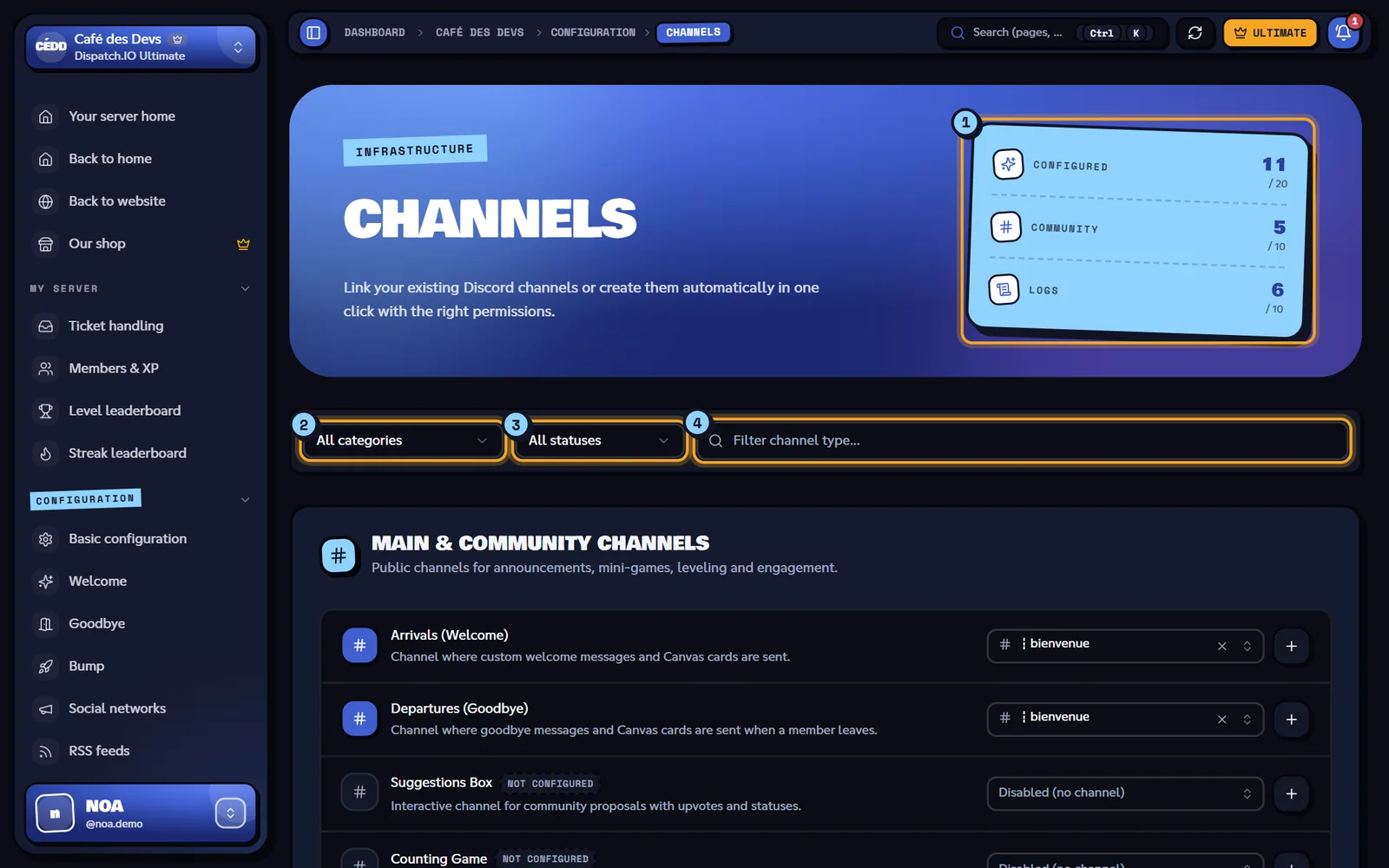
- Indicators: Configured (channels set to 20), Community (out of 10), and Logs (out of 10).
- Category filter: All categories, Main & Community Channels or Logs & Audit Channels (Private).
- Status filter: All statuses, Configured or Unconfigured.
- Search: "Filter a channel type..." searches within the name and description of each type.
The number of results is displayed next to the filters, and Reset clears them. If nothing matches: "No channel types match your filters."
Channels are organized into two sections:
- Main & Community Channels: public channels for announcements, events, and mini-games.
- Logs & Audit Channels (Private): channels reserved for staff, marked Private channel (staff).
A type without a channel displays the orange Unconfigured badge.
Link an existing channel
- Locate the channel type row (for example Level-up (XP)).
- Open the dropdown on the right and choose a channel. You can type a few letters in "Search for a channel...".
- To stop using a channel for this type, choose Disabled (no channel).
- Click Save changes in the bar that appears at the bottom.
The list offers text channels and announcement channels from your server. A channel you just created on Discord will appear after clicking Update data, in the site header.
Warning
For joins, leaves, and all log channels, choose a normal text channel. An announcement channel is offered in the list, but the bot does not post welcome/goodbye messages or logs there.
Create a channel in one click
The + (Create automatically) button at the end of each row creates the channel immediately on Discord and assigns it to the type, without going through saving.


- The Unconfigured badge.
- The channel list.
- The + button that creates the channel.
What the bot creates:
- a text channel named with the server's channel separator followed by a fixed name, for example
┇logs-messages(the separator can be set in Basic Configuration); - the channel topic: "Automatic channel managed by Dispatch.IO™", followed by the type in parentheses (for example
(LOGS_MESSAGE)); - for audit logs, ticket transcripts, and Dispatch news: a private channel that only the bot can see. Then grant access to your team in the channel permissions on Discord;
- for the suggestion box: a 60-second slowmode.
The message "The channel #... was successfully created and assigned!" confirms the creation. The save bar then appears, but the channel is already saved; saving does not change anything further.
Note
The bot must have the Manage Channels permission on the server. Otherwise: "Error during automatic channel creation."
Main & Community Channels
| Type (name on the page) | What it is used for | Name created by + | Where else to set it |
|---|---|---|---|
| Arrivals (Welcome) | Welcome message and card for new members | bienvenue | Welcome and goodbye |
| Departures (Goodbye) | Goodbye message and card | au-revoir | Welcome and goodbye |
| Suggestion Box | Posted messages become suggestions with votes | suggestions | Polls, giveaways, and suggestions |
| Counting Game | Mini-game: members count together, one number per message, not twice in a row; an error resets the count to 1 | comptage | — |
| Bump Reminders | Despite its name, this is the channel where bumps from other servers arrive (the same as Bump reception channel) | bumps | Bump |
| Level-ups (XP) | Level-up announcements | niveaux | Levels |
| Streaks | Daily streak announcements | flammes | Streaks |
| Dispatch News & Patches | Receives Dispatch.IO update announcements | dispatch-updates (private) | — |
| Captcha Verification | Channel where newcomers complete the captcha | verification | Security and anti-raid |
Audit log channels
All these channels are created as private using the + button. The content of each log is detailed in Logs (logs).
| Type (name on the page) | What is published there | Name created by + |
|---|---|---|
| General Server Logs | Server, role, and channel modifications, and every configuration change made on the site or with /config | dispatch-logs |
| Message Logs | Deleted and edited messages, bulk deletions | logs-messages |
| Member & Profile Logs | Nicknames, added or removed roles, avatars | logs-membres |
| Voice Activity Logs | Voice connections, disconnections, moves, and mutes | logs-vocaux |
| Joins & Leaves Logs | Members joining or leaving the server | logs-arrivees-departs |
| Moderation & Sanctions Logs | Bans, kicks, timeouts, warnings (critical log: emergency mentions) | logs-sanctions |
| Anti-Raid & Security Logs | Anti-raid alerts and lockouts (critical log) | logs-securite |
| Invite Link Logs | Creation, usage, and deletion of invites | logs-invitations |
| Captcha Validation Logs | Captcha attempts and successes | logs-captcha |
| Ticket Transcripts & Archives | Saved ticket transcripts (same setting as Archive channel on the Tickets page) | archives-tickets |
Tip
Start at least with General Server Logs: this is where you can find all configuration changes, along with the name of the person who made them.
Save and verify
Click on Save changes in the bottom bar. The message "Channel configuration saved successfully!" confirms the save. The bot uses the new channels immediately and publishes a line for each changed channel in General Server Logs.
The same settings can be modified from other pages: the welcome channel on the Welcome page, the reception channel on the Bump page, the archive channel on the Tickets page, etc. A change made there appears here when you reload the page, and vice versa.
| Message | Cause |
|---|---|
| "Error while saving channel configuration." | The save failed: try again. |
| "Error during automatic channel creation." | The bot could not create the channel (often due to missing Manage Channels permission). |
| "Channel configuration updated by ..." | Another administrator just saved: the page displays their changes. |
Related pages
- Server home : channel separator and emergency mentions.
- Logs : the content of each log channel.
- Logs : the history of changes on the site.
- Bot configuration : channels via
/configin Discord.