
Dispatch.IO doesn't only answer commands: it reacts to what happens on your server. A member joins, a message is deleted, a channel changes, someone joins a voice channel… For each of these events, Discord notifies the bot, which triggers the modules concerned: logs, anti-raid, welcome, levels, flames, temporary channels, and so on.
This page is for administrators who want to understand what the bot does automatically and in which order. It also lists what happens when you save a setting on the dashboard.
Every Discord event
What the bot does on each event.
| Event | When | What the bot does |
|---|---|---|
| Bot startup | The bot connects | Prepares its data, resumes timers and starts its recurring tasks (see Scheduled tasks). |
| Bot added to a server | Someone invites the bot | Checks that the server isn't banned, creates the default configuration, posts the language choice then the getting-started message. |
| Bot removed from a server | Someone kicks the bot | Marks the server as inactive (the configuration is kept), removes the server's own commands. |
| Server updated | Name, icon, owner… | Log, updates the icon, banner and owner, anti-raid (server changes). |
| Member joined | A member joins | Logs, anti-raid, raid mode, captcha, then welcome message and roles (see below). |
| Member left | A member leaves or is kicked | Logs, removal from running giveaways, goodbye message. |
| Member updated | Nickname, roles, timeout… | Log; puts the flame suffix back in the nickname if needed; updates dashboard access if their permissions change. |
| Member banned | A ban | Log, anti-raid (mass bans). |
| Member unbanned | An unban | Log. |
| Channel created | A new channel | Log, anti-raid (mass creations). |
| Channel updated | A channel's settings | Log (changes made close together are grouped). |
| Channel deleted | A channel disappears | Cleanup of the channel's polls, giveaways and triggers, anti-raid (channel deletion, possible recreation), critical log, update of the settings that used this channel. |
| Role created | A new role | Log. |
| Role updated | A role's settings | Checks the bot's permissions (see below), then log. |
| Role deleted | A role disappears | Cleanup of triggers, critical log, update of the settings that used this role. |
| Invite created | An invite link | Anti-raid (mass invites), remembers the invite to track joins. |
| Invite deleted | An invite is deleted | Log if it's the bump invite, forgets the invite. |
| Message sent | A message is posted | Anti-raid, temporary channels, suggestions, counting, word reactions, XP, flames… (see below). |
| Message edited | A message is edited | Log, anti-raid on the new text (not for bots), live ticket tracking. |
| Message deleted | A message disappears | Log, cleanup (suggestion, running poll or giveaway, triggers), live ticket tracking. |
| Reaction added or removed | A member reacts | Reaction roles: gives or removes the role. |
| Thread created or deleted | A thread on a suggestion card | Updates the thread button on the card. |
| Voice activity | Connection, disconnection, channel switch, mute… | Log, flames, statistics, temporary voice channels, voice XP, stops the music if the bot's channel is empty. |
| Webhooks updated | A webhook created or changed | Anti-raid (mass webhooks). |
| Interaction | Command, button, menu, window | Runs the requested command or action. |
| User profile updated | Global name or avatar | Nothing. |
The music player also has its own events: track starting, queue changed, queue finished, player stopped. They update or delete the player message (see Music player).
Note
The bot's technical errors are automatically reported to the Dispatch.IO team.
When the bot joins or leaves a server
The bot is added
- Check: if the server is banned from Dispatch.IO, the owner gets a DM explaining the reason, then the bot leaves the server. If the owner is on the Dispatch.IO blacklist, the bot leaves the server without a message.
- Default configuration: English language, color
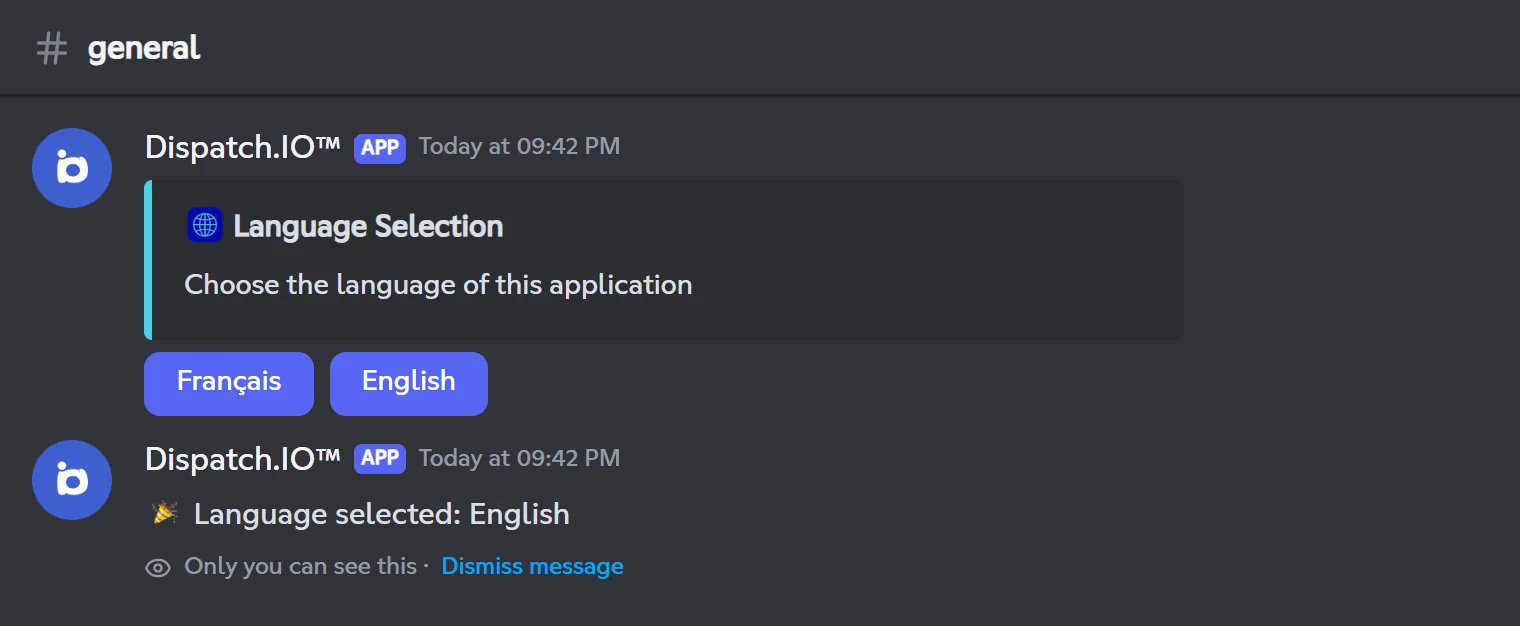
#48D1E1, Europe/Paris time zone, channel name separator┇, default welcome image. The owner is added to the anti-raid whitelist with every permission. The leveling system is turned off. No channel or role is created. - Language choice: in the first text channel where it can write, the bot posts a message in English with two buttons, Français and English. Any member can click. Without a click within 24 hours, English is kept.
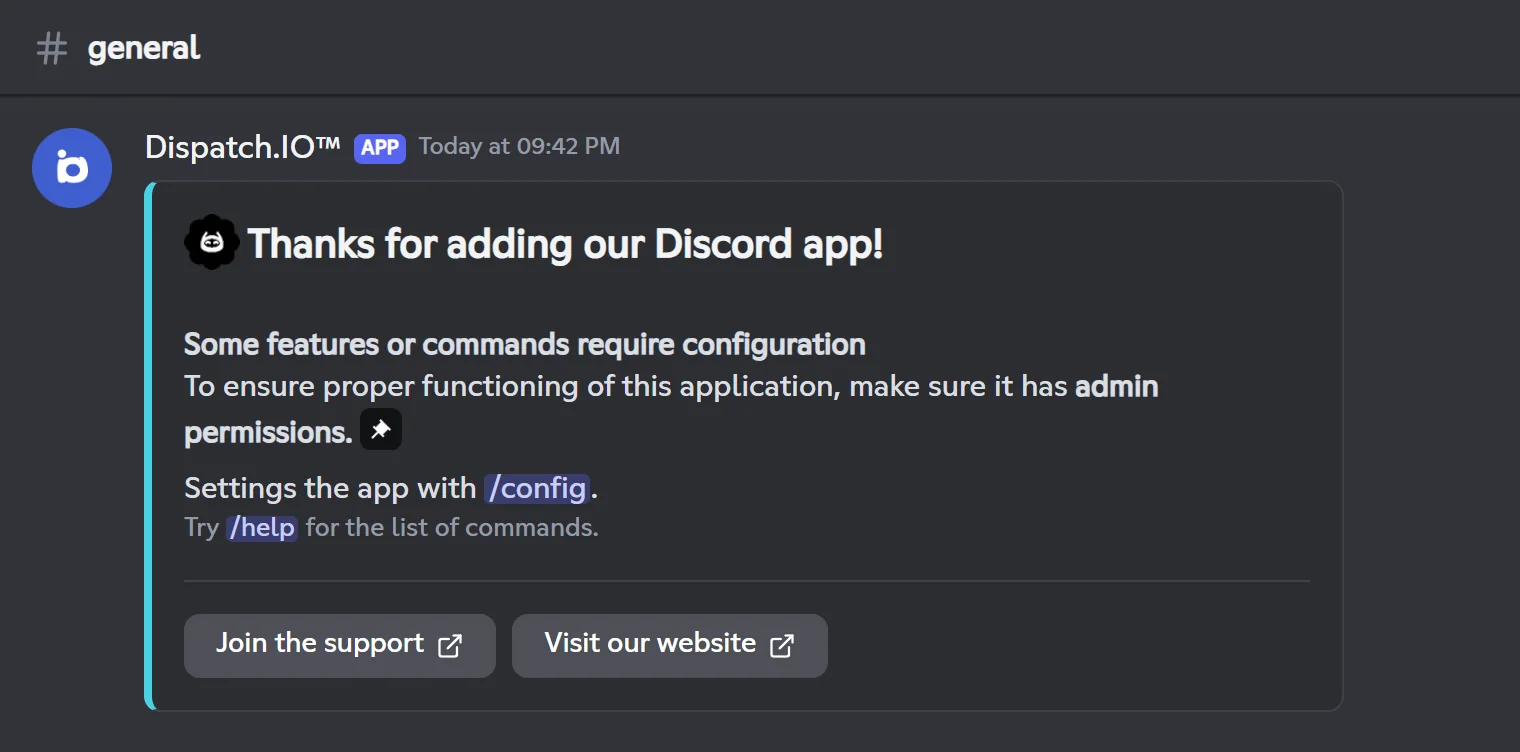
- Getting-started message: after the choice (or the 24 hours), the choice message is deleted and the bot posts a welcome message with the
/configand/helpcommands, and links to the support server and the website.
Note
If the bot is added while it is offline, or if it restarts before someone picks the language, these messages aren't sent (or the buttons stop responding). In that case, change the language in /config → Language and time zone or on the dashboard.
The bot is removed
The server switches to "bot not present" on the dashboard and its own commands (levels, aviation) are removed. The whole configuration is kept (channels, messages, anti-raid…). If you invite the bot again, the leveling system is turned off again: turn it back on if needed.
Note
If, after inviting the bot again, the dashboard keeps saying that the bot isn't on the server, contact Dispatch.IO support.
A member joins
The steps, in order.
When a member joins the server, the bot goes through these steps. Some of them can stop the rest:
- Join logs are posted first: even a member kicked right away by the anti-raid shows up there.
- A reported member (Dispatch.IO blacklist or the DangerCord service) triggers an alert in the join logs, but isn't kicked (unless raid mode is on).
- With the captcha, the welcome message and welcome roles only come after it is passed, up to 3 minutes after joining.
- Bots go through these steps too (except the captcha): an authorized bot gets a welcome message and the welcome roles.
Details are on the Anti-raid and security and Welcome and goodbye pages.
A member leaves
- Invite log (who had invited the member) and departure or kick log.
- The member is removed from the server's running giveaways.
- Their server tag is forgotten for this server.
- The goodbye message is posted, if the goodbye channel is set.
Every message sent
The order of the modules.
For every message posted on the server, the bot goes through this order:
| Step | Also for bots? | Can stop the rest? |
|---|---|---|
| 1. Live ticket tracking (for the dashboard) | Yes | No |
| 2. Anti-raid filters (links, spam, mentions, forbidden words) | — | Yes, if the message is sanctioned |
| 3. Temporary channel: schedules the message's deletion | Yes | No |
| 4. Temporary voice channel: counts messages to repost the panel | Yes | No |
| 5. Activity statistics | No | No |
| 6. Automatic reply when someone mentions the bot | No | No |
| 7. Day's flame | No | No |
| 8. Suggestions box | No | Yes, in the suggestions channel |
| 9. Counting game | No | No |
| 10. Word reactions | No | No |
| 11. Message XP | No | No |
Members on the Dispatch.IO blacklist trigger neither the automatic reply, nor the flame, nor word reactions, nor XP.
Voice activity
On every voice connection, disconnection or channel switch, the bot:
- posts the voice log;
- validates the member's flame for the day;
- counts the time spent in voice for the dashboard statistics;
- creates a temporary voice channel if the member joins a creator channel, or deletes a temporary channel that became empty (5 seconds later);
- starts or stops the member's voice XP;
- stops the music or radio if no members are left in the bot's channel.
A state change (mute, camera, screen sharing) also produces a log and counts for the flame.
When the bot loses permissions
Every time a role is updated, the bot checks its own permissions and turns off the modules that can no longer work:
| Missing permission | Module turned off |
|---|---|
| Administrator | Anti-raid |
| Manage Channels or Manage Roles | Leveling system |
| Manage Channels | Flames |
Each shutdown is recorded in the logs (anti-raid in Anti-Raid & Security Logs, the others in General Server Logs). Give the permission back to the bot, then turn the module back on in /config or on the dashboard.
Automatic cleanup
| What disappears | What the bot cleans up |
|---|---|
| A channel | That channel's running polls and giveaways, message triggers, RSS feeds and social networks that posted there, a ticket system's channel or category (to be reconfigured), the list of channels allowed for links. A channel used by the bot's configuration (logs, welcome…) is removed from it, except when the anti-raid's channel deletion protection recreates it (see Anti-raid and security). |
| A message | A suggestion card's thread, the running poll or giveaway, the triggers (buttons, reactions) attached to the message. |
| A role | Welcome roles, the level reward, the role mentioned by a social network, giveaways (cancelled if it was the reward) and the triggers that used it. The deletion log lists these consequences. |
| A member | Their entries in running giveaways. |
What the website sends to the bot
What changes on the bot when you save on the dashboard.
When you save a setting on the dashboard, the website updates the configuration and notifies the bot. The bot then applies the change and, for most pages, posts a "Configuration Update" log in General Server Logs (or Anti-Raid & Security Logs for security).
| Dashboard page | What the bot does | Log on Discord | Delay |
|---|---|---|---|
| Basic configuration (language, time zone, color, separator) | Uses the new settings right away | Yes | Immediate |
| Basic configuration (emergency mentions) | Uses the new recipients | Yes | Immediate |
| Security (raid mode) | Turns raid mode on or off; on a Community server, also pauses invites and/or DMs depending on the options picked | Yes (anti-raid) | Immediate |
| Security (whitelist) | Uses the new list | Yes | Immediate |
| Anti-Raid | Uses the new settings | Yes, one per protection (anti-raid) | Immediate |
| Welcome | Uses the new channel, message, image and roles; Test Welcome Message posts a real welcome message for you; the preview is drawn by the bot | Yes | Immediate |
| Goodbye | Uses the new settings; Test Goodbye Message and the preview go through the bot | No | Immediate |
| Bump | Uses the new settings; the preview goes through the bot | No | Immediate |
| Levels | Adds or removes the server's level commands; when turned off, cancels XP giveaways; the preview goes through the bot | Yes | Immediate (commands: a few seconds) |
| Flames | Uses the new settings | No | Immediate |
| Channels | Uses the new channels; the + button creates the channel | Yes, one per channel changed | Immediate |
| Other commands (aviation) | Adds or removes /zulu, /metar and /frequencies | Yes | A few seconds |
| Tickets (configuration) | Posts, updates or deletes the ticket panel | Yes | A few seconds |
| Role Reactions | Posts or edits the panel, adds the buttons or reactions; a deletion removes them | Yes | A few seconds |
| Word reaction, Temporary channels, Temporary voice channels | Reads the new settings directly | No | Immediate |
| Social networks, RSS feeds | Picks up changes on the next check; Check & send last video / Check & send last article runs a check right away | No | Depends on the check frequency |
| Members & XP | Uses the new XP, with no level-up announcement and no role change | No | Immediate |
| Ticket handling (a ticket's workspace) | Sends, edits or deletes messages, closes, reopens, claims, renames, saves; applies the sanctions requested from the ticket | Depends on the action | A few seconds |
Sanctions given from the dashboard follow the same rules as the commands: DM to the member, infraction saved and log in Moderation & Sanction Logs.
Tip
Every change made on the website, even the ones that produce no log on Discord, is visible on the dashboard's Configuration Logs page.
What the bot sends back to the website
The bot also keeps the dashboard up to date live:
- Bot presence: when the bot is added or removed, the server's page switches from "bot not present" to "bot present" (and back).
- Dashboard access: when a member's permissions change (roles, ownership), their access to the server's dashboard is updated.
- Tickets: ticket messages and status (open, closed, deleted) show up live in the ticket handling workspace.
- Statistics: activity (messages, commands, voice minutes) feeds the Statistics page.
- Role Reactions: the list of panels updates once the bot has posted the panel.
More details on the Synchronisation with the bot page.
Related pages
- Scheduled tasks: what the bot does at regular intervals.
- Logs: the content of each log.
- Anti-raid and security: the protections triggered by these events.
- Bot configuration:
/configand default settings.