
The Dispatch.IO anti-raid watches your server around the clock and reacts on its own to dangerous behaviour: spam, links, forbidden words, mass mentions, mass joins, brand-new accounts, apps added without permission, channels, bans, invites or webhooks created in bulk, and sensitive server changes. This page explains, protection by protection, what triggers a reaction, the sanction applied and what members and staff see.
It is written for server owners and administrators. To turn on and tune each option, see Bot configuration (the /config command) or the Security and anti-raid page of the website.
Overview
Dispatch.IO security is made of five building blocks:
| Building block | What it does | Where to set it |
|---|---|---|
| Anti-raid (14 protections) | Detects dangerous behaviour, sanctions the author and undoes the damage | /config → Antiraid, Anti-Raid page of the website |
| Raid mode | Kicks every new member during an attack | /raid-mode, Security page of the website |
| Whitelist | Exempts members, roles or apps from some protections | /config → Whitelist, Security page of the website |
| Emergency mentions | Mention your staff in important logs | Basic configuration page of the website |
| Flagged member alert | Warns your staff when a reported account joins | Automatic |
For every anti-raid protection, the bot follows the same path:
The protections fall into three families, detailed below: message filters, join control and server protections.
Before you start
Turning the anti-raid on
- Turn on the master switch: the button labelled Enabled in
/config→ Antiraid, or Enable Anti-Raid on the Anti-Raid page of the website. While it is off, no protection acts, the captcha included. - Pick the Anti-Raid log channel (called Raid logs channel in
/config→ Channels): this is where the bot reports everything it does. - Turn on the protections you want one by one. On a new server, all of them are off.
Raid mode and the flagged member alert work even while the anti-raid is off.
The bot's permissions
The bot needs specific permissions to sanction and repair. Keep the Administrator permission on it (it includes all of them) and put its role above the roles of the members it must watch (see Permissions and roles).
| Bot permission | Used to |
|---|---|
| Administrator | Configure the anti-raid in /config. If the bot loses it, the anti-raid turns itself off the next time a role of the server is edited. |
| View Audit Log | Find who added an app, created or deleted a channel, banned someone, created an invite or a webhook, or changed the server |
| Manage Messages | Delete filtered messages |
| Timeout Members | Apply timeouts |
| Manage Roles | Remove an offender's administrator roles |
| Kick, Accept, and Deny Members | Kick apps, mass joins, recent accounts, raid-mode newcomers, captcha failures |
| Ban Members | Ban repeat recent accounts, unban after a mass ban |
| Manage Channels | Delete mass-created channels, recreate a deleted channel |
| Manage Webhooks | Delete mass-created webhooks |
| Manage Server | Delete invites, undo a server change, Discord safety actions of raid mode |
When a permission is missing, the action is skipped and the bot posts an error in the Server logs channel.
Warning
Without View Audit Log, the protections that need to find an author (apps, channels, bans, invites, webhooks, server changes) do nothing, with no error message at all.
Who is never sanctioned
- The bot itself: its own actions (recreating a channel, unbanning…) trigger nothing.
- The server owner and the Dispatch.IO creators, for message filters and join control.
- Whitelisted members, roles and apps, for the protections covered by their scope.
Messages from other bots are filtered like members' messages. Messages sent through a webhook are not filtered.
Thresholds
Thresholds (number of messages, time window…) are the same for every server and set by the Dispatch.IO team. The values on this page are the defaults. Only the minimum age of recent accounts is set per server.
Warnings and sanctions
Message filters: warnings, then a timeout
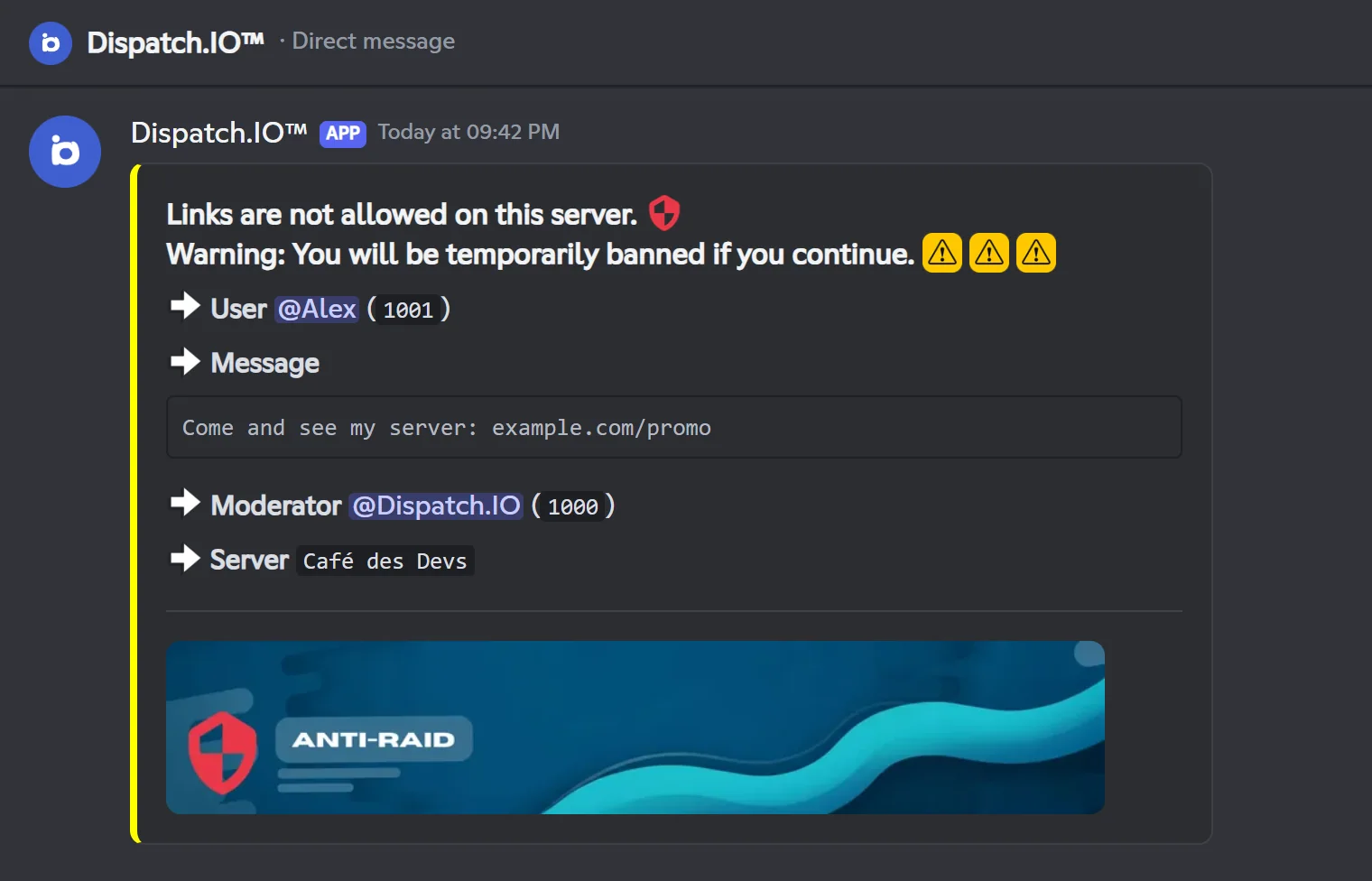
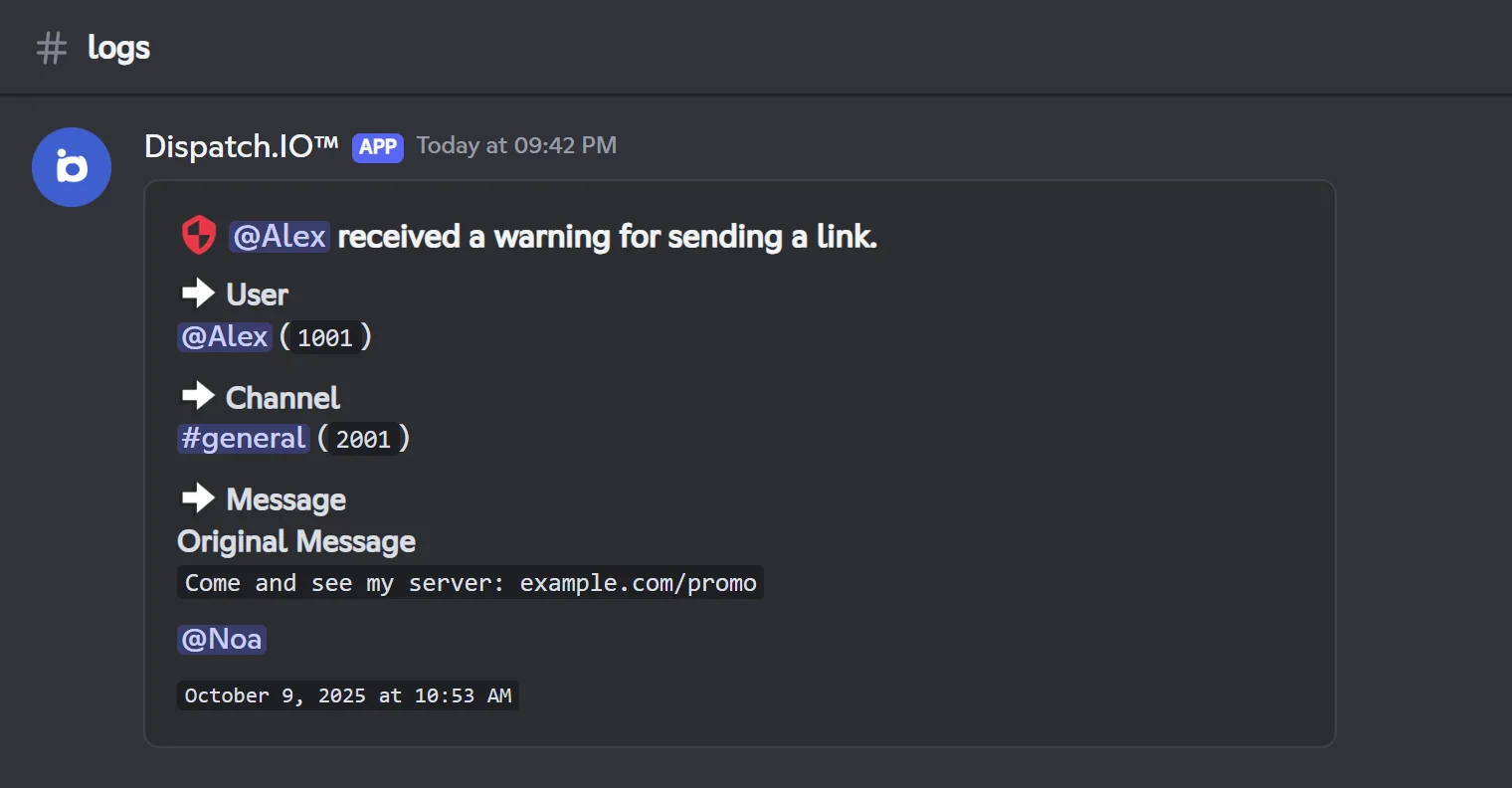
For links, abusive mentions and forbidden words, each offending message is deleted and earns a warning: an infraction is recorded, the member gets a DM and the raid logs channel gets a log. On the 3rd warning within the protection's time window, the member gets a 24-hour timeout.
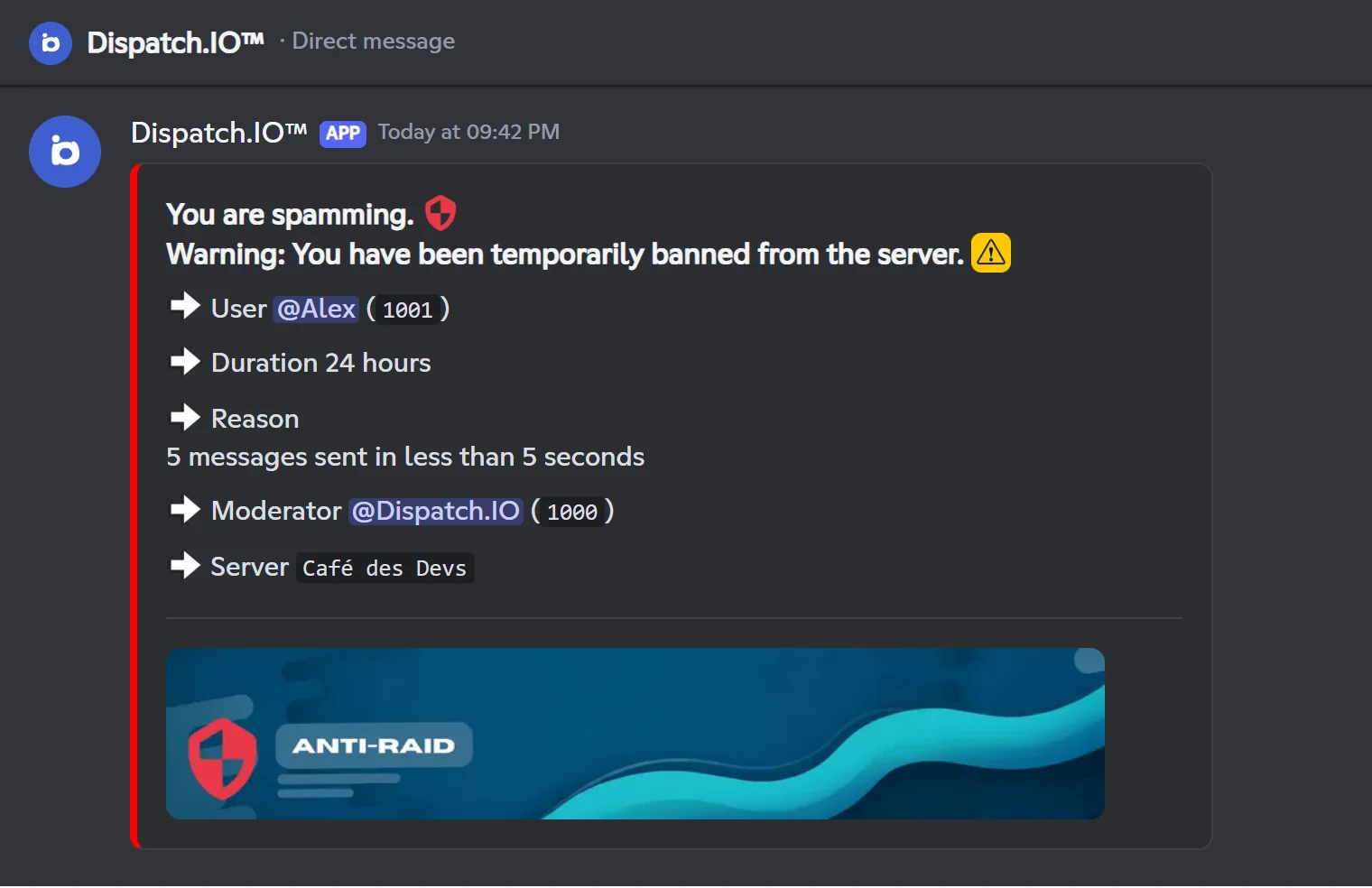
Spam is stricter: a 24-hour timeout on the first detection, with no warning.
Server protections: role removal, timeout and repair
For channel creation, channel deletion, invites, webhooks and server changes, the bot:
- removes the offender's roles that have the Administrator permission (except roles managed by an integration);
- gives them a 3- or 7-day timeout depending on the protection;
- undoes the damage (channels deleted or recreated, invites or webhooks deleted, settings restored).
If the offender is an app whose integration role has the Administrator permission, it is banned instead of timed out.
Mass ban works slightly differently: the bot removes the offender's ADMIN and MODO staff roles registered for the server (see Permissions and roles), gives a 7-day timeout, then unbans the victims.
Note
DMs and logs talk about a "temporary ban", but it really is a timeout: the member stays on the server but cannot write or speak until it ends.
Infractions
Every anti-raid warning and timeout is recorded as an infraction issued by the bot. You can find them with /infractions (see Moderation). Deleting a warning lowers the counter that leads to a timeout.
Logs
Every warning and sanction is posted in the Raid logs channel: the member, the channel, the deleted message and, for a timeout, the reason and the sanction. Emergency mentions are added at the bottom (see below).
Message filters
Spam, links, abusive mentions and forbidden words.
The filters check every new message and every edited message. They ignore the owner, the Dispatch.IO creators and members whitelisted with the Messages scope. They run in this order, and only the first one that detects something acts: links, spam, abusive mentions, forbidden words.
| Protection (website) | /config menu | Default trigger | Sanction |
|---|---|---|---|
| Anti-spam protection | Anti-Spam | 5 messages in 5 seconds | Immediate 24-hour timeout |
| Link protection | Anti-Link | Every link outside the allowed channels | Warning, 24-hour timeout on the 3rd within 60 seconds |
| Mention abuse protection | Anti-Mention abusive | 6 mentions in one message, or 3 messages with mentions within 30 seconds | Warning, 24-hour timeout on the 3rd within 30 seconds |
| Forbidden words protection | Anti-Bad words | Every message containing a forbidden word | Warning, 24-hour timeout on the 3rd within 24 hours |
Anti-spam
- Trigger: a member's 5th message within 5 seconds, all channels combined. Message edits count too.
- Sanction: an immediate 24-hour timeout, and removal of the roles that have the Administrator permission. An administrator app is banned.
- For 10 seconds, every new message from that person is deleted as soon as it is sent.
- Clean-up: the bot deletes the latest messages of the channel, as many as the spammer's recent messages.
Warning
The clean-up deletes the latest messages of the channel, whoever wrote them: if other members posted in the meantime, some of their messages can go too.
Links
- Trigger: anything that looks like a link, with or without
https://:example.com,discord.gg/…, IP addresses, GIF links, but also words such asreadme.mdorscript.py. The content of forwarded messages is checked too. - Exceptions: the channels allowed for links and open ticket channels. Threads of an allowed channel are not exempt.
- Action: message deleted and a warning. On the 3rd warning within 60 seconds, a 24-hour timeout.
- Setting: the list of allowed channels (Channels allowed for links on the website, Edit allowed channels in
/config). In/config, your selection replaces the whole list. A deleted allowed channel is removed from the list automatically.
Abusive mentions
- Trigger: a message with more than 5 mentions, or 3 messages containing mentions within 30 seconds. Member and role mentions,
@everyoneand@herecount (even if the member is not allowed to use them). The automatic mention of a reply does not count. - Action: message deleted and a warning. On the 3rd warning within 30 seconds, a 24-hour timeout.
Forbidden words
- The list: a built-in list of insults, hate speech, threats and a few scam phrases, in French and English, always active and not displayed, plus your own words (50 characters max each).
- Detection: case and accents are ignored. The bot also spots letters separated by spaces, dots or underscores (
b.a.d) and digits or symbols used as letters in the message (3for e,0for o,$for s…). - Action: message deleted and a warning; the log shows the detected word. On the 3rd warning within 24 hours, a 24-hour timeout.
- Setting: the Forbidden words list on the website, or Add a word / Remove a word in
/config.
Caution
- Words are matched anywhere, even inside another word: a short word can trigger on innocent words that contain it.
- Do not use special characters such as
(,),[,],+,*or?in your words: they stop the whole filter from working on your server. - A word already used by another Dispatch.IO server is not saved, even if
/configreplies "Word added".
Join control
Apps, mass joins, recent accounts and captcha.
On every join, the bot checks the new member in this order:
App additions (Anti-App)
- Trigger: any app (bot) added to the server, whoever adds it, the owner included, unless the app is whitelisted with the App additions or Global scope.
- Action: the app is kicked, then a log is posted. If the person who added it is not an administrator, they get a warning and a second log shows who added it.
- Before installing an app, whitelist it: the Whitelist an app button on the website (you can paste the ID of an app that is not on the server yet) or
/config→ Whitelist → Add.
Mass joins (Anti-Join massif)
- Trigger: the 6th newcomer within 10 seconds (not counting members whitelisted with Joins / recent accounts).
- Action: every member who joined during those 10 seconds and is still there gets a DM, then is kicked. Each new join within the window repeats this. The log lists the kicked members.
- Raid mode does not turn on by itself: if the attack goes on, turn it on yourself.
Recent accounts (Anti-Recent account)
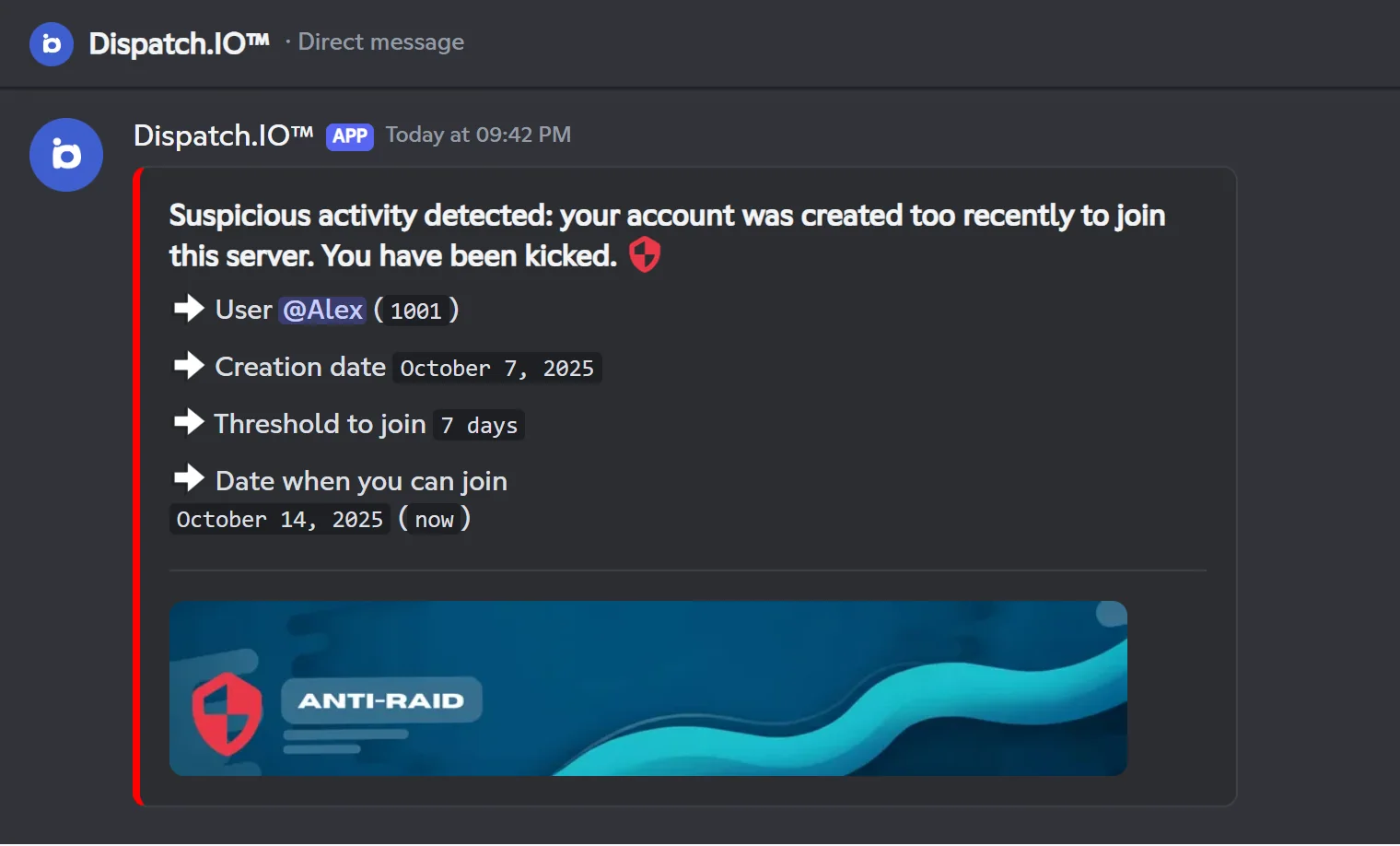
- Trigger: a Discord account created less than 7 days ago (adjustable from 0 to 365 days: Min. age (days) on the website, Configure account creation threshold in
/config). - Action: a warning, a DM (account creation date and the date from which they can come back), then a kick. On the 3rd attempt within that period, the account is banned.
- The log shows the same information.
Captcha (Security Captcha)
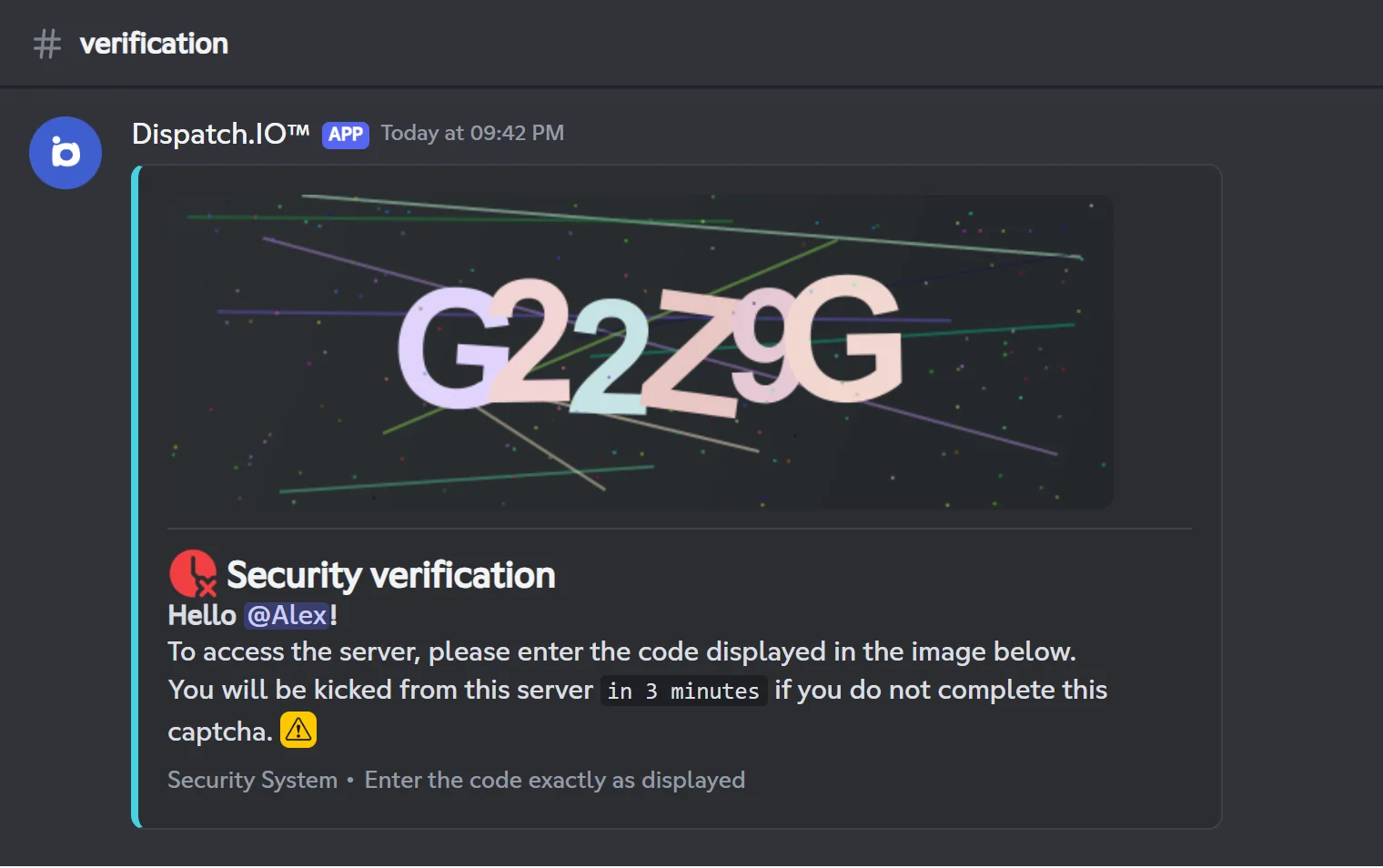
The captcha asks every newcomer to copy a code before they can use the server.
- Conditions: anti-raid on, captcha protection on and a Captcha channel (text channel) picked. Otherwise the join goes on as usual. Bots skip the captcha.
- How it goes:
- The bot posts in the captcha channel an image with a 6-character code (letters and digits, without I, O, 0 or 1), mentions the member and says they have 3 minutes.
- The member types the code in the channel. Each of their messages is deleted right away. Case does not matter, but there must be no extra space.
- After a wrong code, the message shows "Incorrect Code" and the number of attempts left.
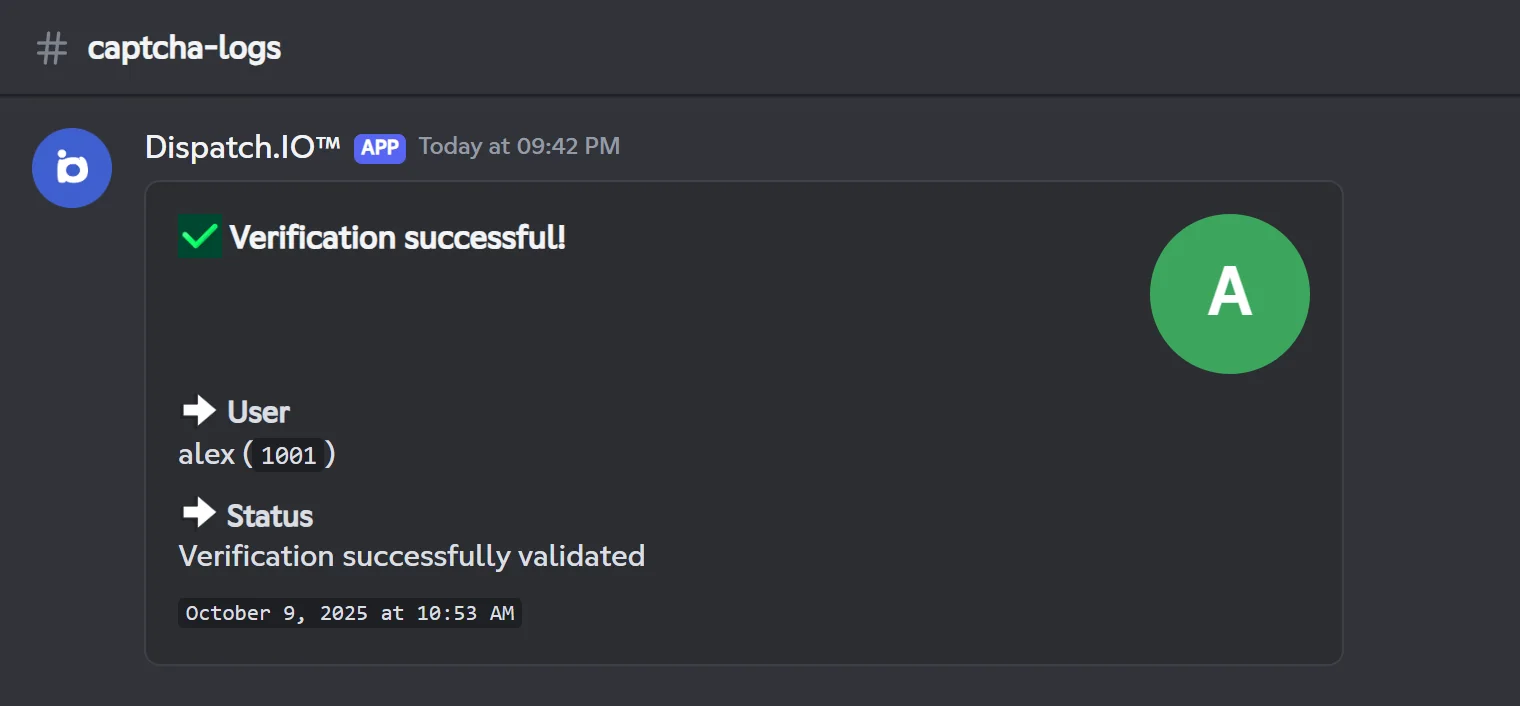
- Success: the captcha message disappears, a log is posted in the Captcha logs channel, then the member gets the welcome message and the welcome roles.
- Failure (wrong code on the last attempt or 3 minutes elapsed): the member gets a DM, a log is posted, then they are kicked.
Important
- The bot hides nothing on its own: during the captcha, the member sees whatever
@everyonecan see. Make the captcha channel visible to newcomers and keep the rest of the server for a welcome role, which is only given after the captcha (see Welcome and goodbye). - In practice, the member has 2 attempts: their 3rd message ends the verification as a failure, even if it contains the right code.
- The whitelist does not skip the captcha.
Server protections
Channels, bans, invites, webhooks and sensitive settings.
These protections watch what staff members do (or a hacked staff account). The bot reads the audit log to find the author: it needs the View Audit Log permission.
| Protection (website) | /config menu | Default trigger | Sanction | Repair | Whitelist scope |
|---|---|---|---|---|---|
| Mass channel creation protection | Anti-Mass channel creation | 3 channels created within 10 seconds on the server, at least 2 by the same person | Role removal + 3-day timeout | The channels they created in those 10 seconds are deleted | Channel create |
| Mass channel deletion protection | Anti-Mass channel deletion | The same person deletes 3 channels within 30 seconds | Role removal + 7-day timeout | The 3rd deleted channel is recreated | Channel delete |
| Mass ban protection | Anti-Mass ban | 4 bans within 10 seconds on the server, at least 3 by the same person | Removal of ADMIN and MODO roles + 7-day timeout | Their victims are unbanned | Mass bans |
| Invite creation protection | Anti-Mass invite creation | 6 invites created within 60 seconds, at least 5 by the same person | Role removal + 3-day timeout | Their invites are deleted | Invites |
| Webhook creation protection | Anti-Mass webhook creation | More than 100 webhook changes within 60 seconds | Role removal + 3-day timeout | Their webhooks are deleted | Webhooks |
| Server modification protection | Anti-Mass server update | A single change of the server name, verification level or explicit content filter | Role removal + 7-day timeout | The previous setting is restored | Server updates |
Details:
- Channel deletion: only the 3rd deleted channel is recreated, with its name, category, position, permissions, topic and settings, but without its messages. If the bot used it (log channel, welcome channel, channel allowed for links…), the new channel takes over that role.
- Mass ban: bans made with the bot's
/bando not count against the moderator (the bot is the one banning). - Server changes: the icon, the banner and other settings are not watched. To rename the server yourself, make sure you are whitelisted (see the warning in the Whitelist section).
- Webhooks: with the default threshold, this protection almost never triggers. Webhook edits and deletions count too.
The offender gets a DM and every sanction is posted in the raid logs channel.
Raid mode
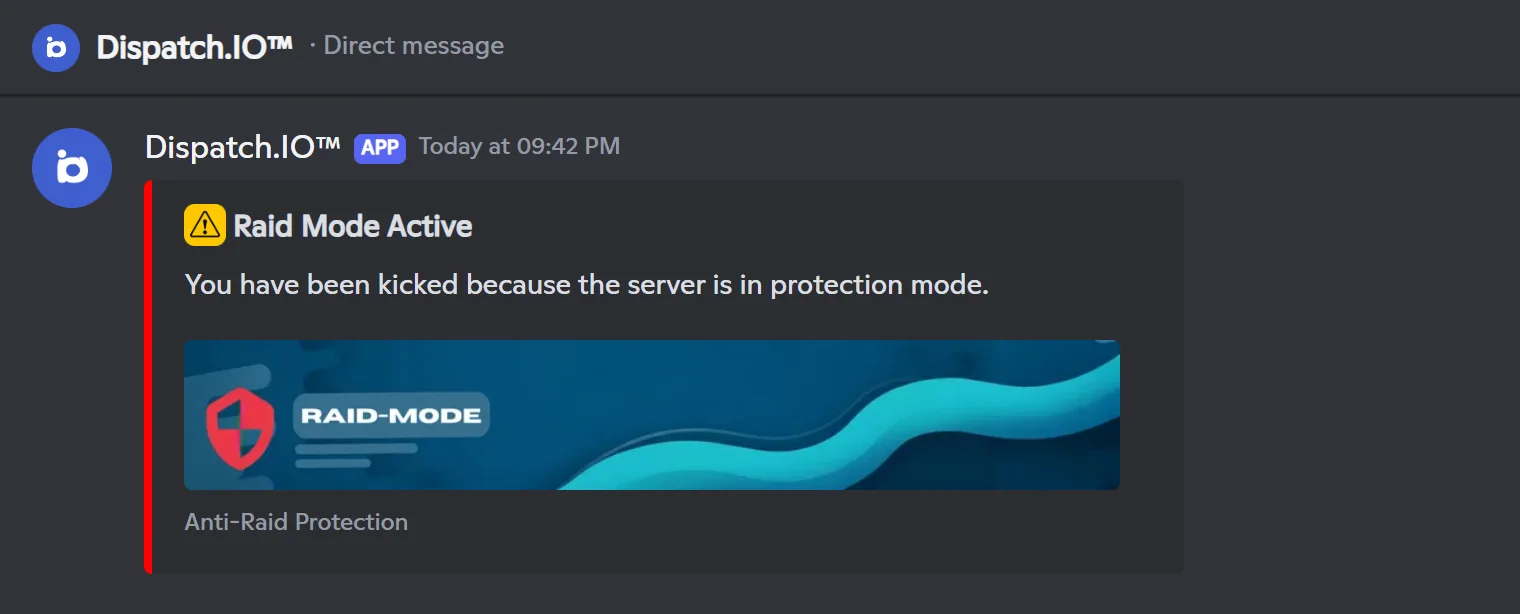
Raid mode is an emergency button: while it is on, every newcomer gets a DM, then is kicked. There are no exceptions: whitelisted members, apps and bots are kicked too.
Turning it on and off
/raid-mode command | Security page of the website | |
|---|---|---|
| Who | Members with the Administrator permission | People who manage the server on the website |
| Duration | 24 hours | 1, 2, 4, 6, 12 or 24 hours (2 hours suggested) |
| Discord safety actions | Always applied | Pause invites and Pause DMs, your choice |
| Turning it off | /raid-mode → Disable | Raid mode switch → Disable |
The command is detailed in Server management.
On a Community server, the bot also applies Discord's safety actions until raid mode ends: invites are paused and DMs between members are paused. On a server without Community, only the kicks apply.
When raid mode ends
- Raid mode stops on its own at the scheduled time. No message is posted at that moment, and the website page may still show Enabled until you reload it.
- No protection turns raid mode on by itself: it is always a staff decision.
What gets logged
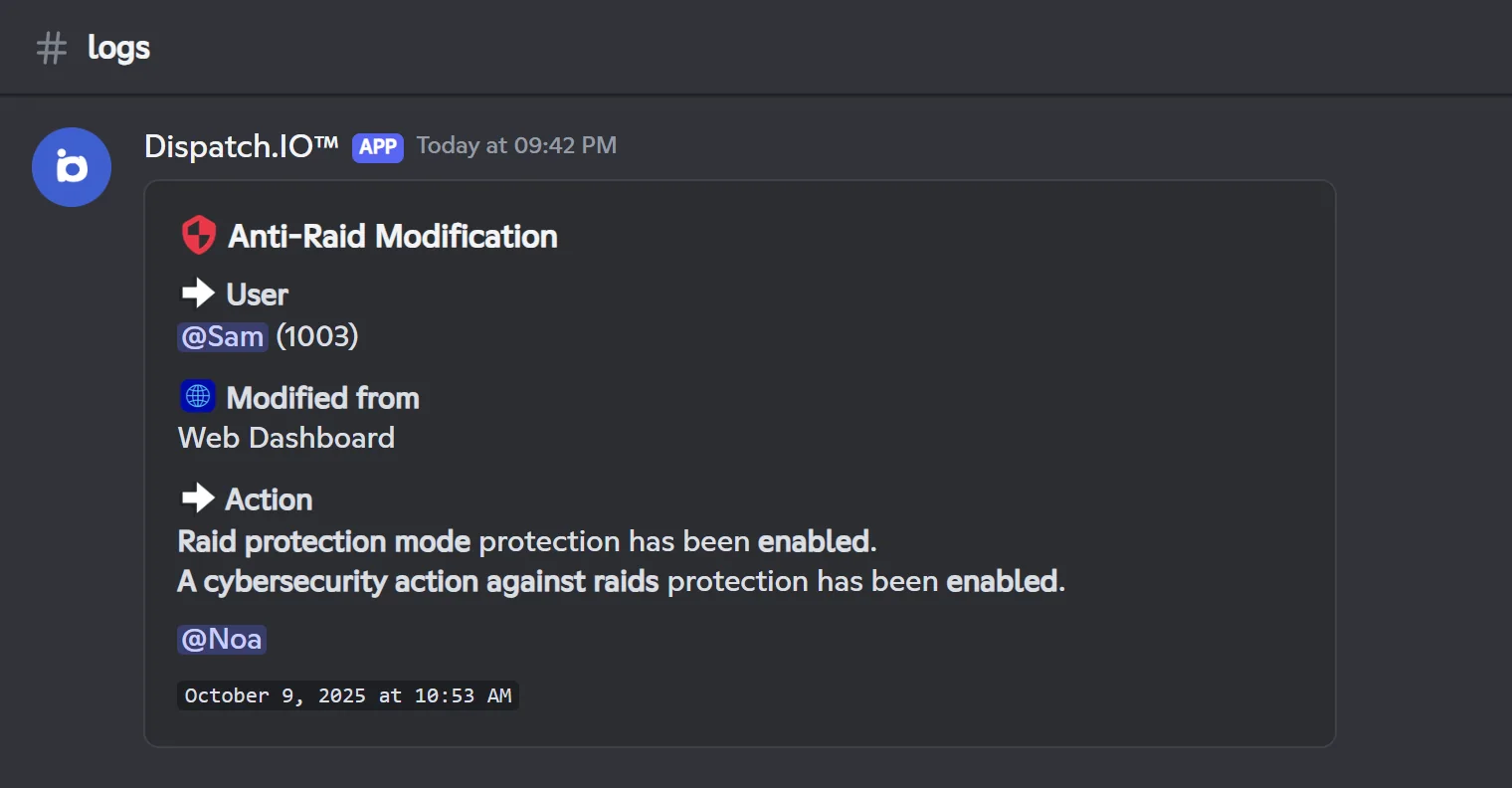
- Turning it on and off is posted in the Raid logs channel, with the emergency mentions.
- Each kick is posted in the Join/leave logs channel ("Automatic Kick - Raid Mode"). This log does not name the kicked member: the join log right above it does.
Whitelist
The whitelist exempts members, apps or roles from some protections. Each entry has a scope: Global (every protection) or a list of specific protections.
| Scope (website) | Protections it exempts from | Do role entries count? |
|---|---|---|
| Global | All of the ones below | Yes |
| App additions | App additions: the app itself must be on the list | No |
| Messages (spam, links, words, mentions) | Anti-spam, links, abusive mentions, forbidden words | Yes |
| Channel create | Mass channel creation | Yes |
| Channel delete | Mass channel deletion | Yes |
| Mass bans | Mass ban | Yes |
| Webhooks | Webhook creation | Yes |
| Invites | Invite creation | Yes |
| Server updates | Server modification | Yes |
| Joins / recent accounts | Mass joins and recent accounts | Yes, but a newcomer has no role yet |
- On the website (Security page): add users or roles, pick their scopes, then save at the bottom of the page.
- In
/config→ Whitelist: add or remove members and apps, always with the Global scope. Roles do not show up there. - Nothing exempts from raid mode or the captcha.
- A member sanctioned with
/timeout,/kickor/ban(or the same action from the website) is removed from the whitelist. - Additions and removals made in
/configare noted in the Server logs channel.
The owner and server protections
The owner is shown as Global and cannot be removed. Yet for server protections (channels, bans, invites, webhooks, server changes), the bot only protects them through a whitelist entry created when the bot joins the server (on an ownership transfer, the bot replaces the former owner's entry with one for the new owner). Saving the whitelist from the website currently removes that entry. In that case, add the owner with /config → Whitelist → Add: otherwise their own changes (renaming the server, for example) can be undone.
Emergency mentions
Emergency mentions alert your staff as soon as an important log is posted: the bot adds mentions at the bottom of the log, which send a real notification.
Logs concerned: everything posted in the Raid logs channel and the Sanction logs channel, plus, in the Server logs channel, the logs of a deleted channel, a deleted role and a server change.
By default, alerts are on with no recipient: the owner is then mentioned on every log concerned, even for a simple link warning.
Everything is set on the Basic configuration page of the website (see Server home):
| Setting (website) | Effect | Default |
|---|---|---|
| Security Alerts | Turns all emergency mentions on or off | On |
| Emergency Roles | Roles mentioned | None |
| Emergency Users | Members mentioned | None (the owner is mentioned when no role or member is picked) |
| Direct Message (DM) Copy | Also sends the log by DM to the emergency users (or the owner). Members of emergency roles do not get a DM. | Off |
- The DM copy needs the Basic or Ultimate plan (see Premium plans and limits). Without it, your choice stays saved and comes back with the plan.
- Each person gets at most one DM every 30 seconds per server: during an attack, not every following log is copied.
Warning
If you turn Security Alerts off, the flagged member alert (below) and the bump invite deletion alert are no longer posted at all.
Flagged members
On every join, the bot checks whether the account is reported on DangerCord (a report database shared between servers) or on the Dispatch.IO blacklist. This check runs even when the anti-raid is off.
If the account is reported, an alert is posted in the Join/leave logs channel: the member, the services reporting them, the reason (for the Dispatch.IO blacklist) and a warning. The emergency mentions are added and send a notification.
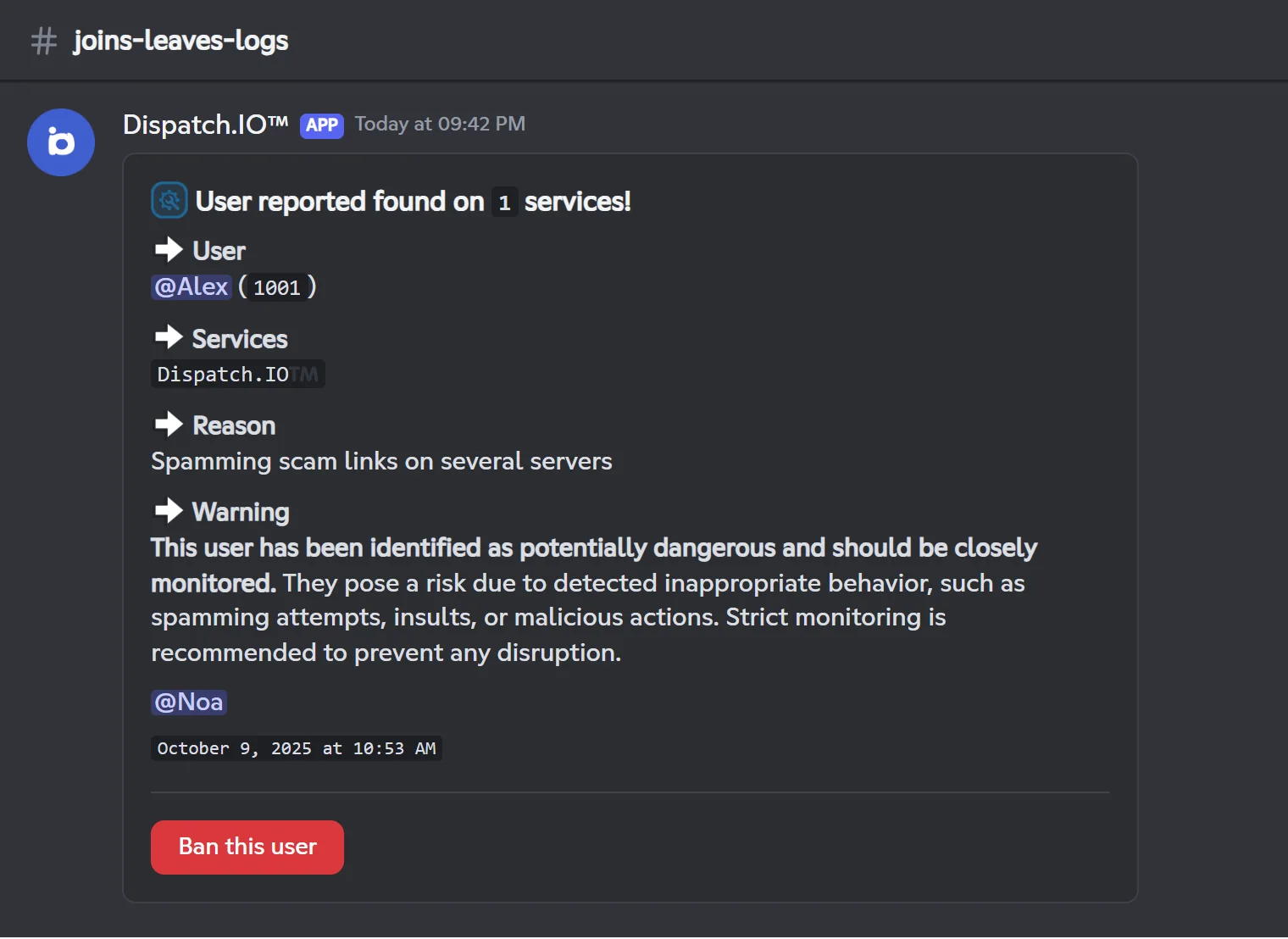
- The bot does not sanction the member by itself: your staff decides.
- The Ban this user button bans the account, even if it has already left the server. It needs the Ban Members permission (or an ADMIN or MODO staff role). The ban is noted in the Sanction logs channel.
Where to find the logs
Channel (/config → Channels) | Name on the website | What security posts there |
|---|---|---|
| Raid logs channel | Anti-Raid & Security Logs | Warnings and sanctions, kicked apps, mass joins, recent accounts, anti-raid changes, raid mode turned on and off |
| Captcha logs channel | Captcha Verification Logs | Captcha successes and failures |
| Join/leave logs channel | Joins & Leaves Logs | Raid-mode kicks, flagged member alerts |
| Server logs channel | General Server Logs | Permissions the bot is missing, deleted channels (and whether they will be recreated), whitelist changes |
| Sanction logs channel | Moderation & Sanction Logs | Bans made with the button of an alert |
These channels must be text channels: announcement channels receive nothing. With no channel picked, the log is simply not posted. More in Logs.
Pitfalls and limits
- Texts do not follow the thresholds: the bot's messages quote fixed numbers ("5 messages sent in less than 5 seconds", "3 links within one minute"…), even if the Dispatch.IO team changes a threshold.
- Apps added by staff: Anti-App also kicks apps added by the owner or an administrator. Whitelist the app before adding it.
- Deleted channels: while the protection is on, the first two deletions by a non-whitelisted member do not show up in the Server logs channel.
- Losing the Administrator permission: the anti-raid turns itself off. Give the permission back to the bot, then turn the anti-raid on again.
/infractions: warnings for recent accounts and app additions show a technical text (antiRaid.recent_account.infraction.reason) instead of a sentence.- Thresholds set at bot level: only the minimum account age is set per server; for everything else, use the whitelist to relax a protection.
Related pages
- Bot configuration: every option of
/config→ Antiraid and Whitelist. - Security and anti-raid: the Anti-Raid and Security pages of the website.
- Server management: the
/raid-modecommand. - Moderation:
/infractionsand manual sanctions. - Permissions and roles: bot permissions and ADMIN and MODO staff roles.
- Logs: every log channel.