
The aviation commands are an optional pack designed for flight simulation servers (virtual pilots and controllers, IVAO communities…). They aren't available by default: an administrator must first turn the pack on for the server. Once enabled, every member can use them, with no special permission.
| Command | In Discord set to French | What it does | Reply |
|---|---|---|---|
/zulu | /zulu | Show UTC (Zulu) time | Only visible to you |
/metar | /metar | Read an airport's weather report (METAR) | Only visible to you |
/frequencies | /fréquences | List an airport's IVAO ATC frequencies | Public in the channel |
Turning on the aviation commands
The pack is turned on for the whole server, either from the dashboard or from Discord. It's included in every plan, Free included.
From the dashboard
- Open your server's dashboard (see Managing your servers), then Other commands in the menu.
- On the Aviation commands card, turn the switch on.
- Click Save changes in the bar that appears at the bottom of the screen.
The card then shows "Pack enabled" and "These commands are registered and available on Discord.". To remove the commands, turn the switch off and save. More details in Other commands.


From Discord with /config
- Run
/config(reserved for server administrators). - In the drop-down menu, choose System for managing other commands.
- Click Enable aviation commands?.
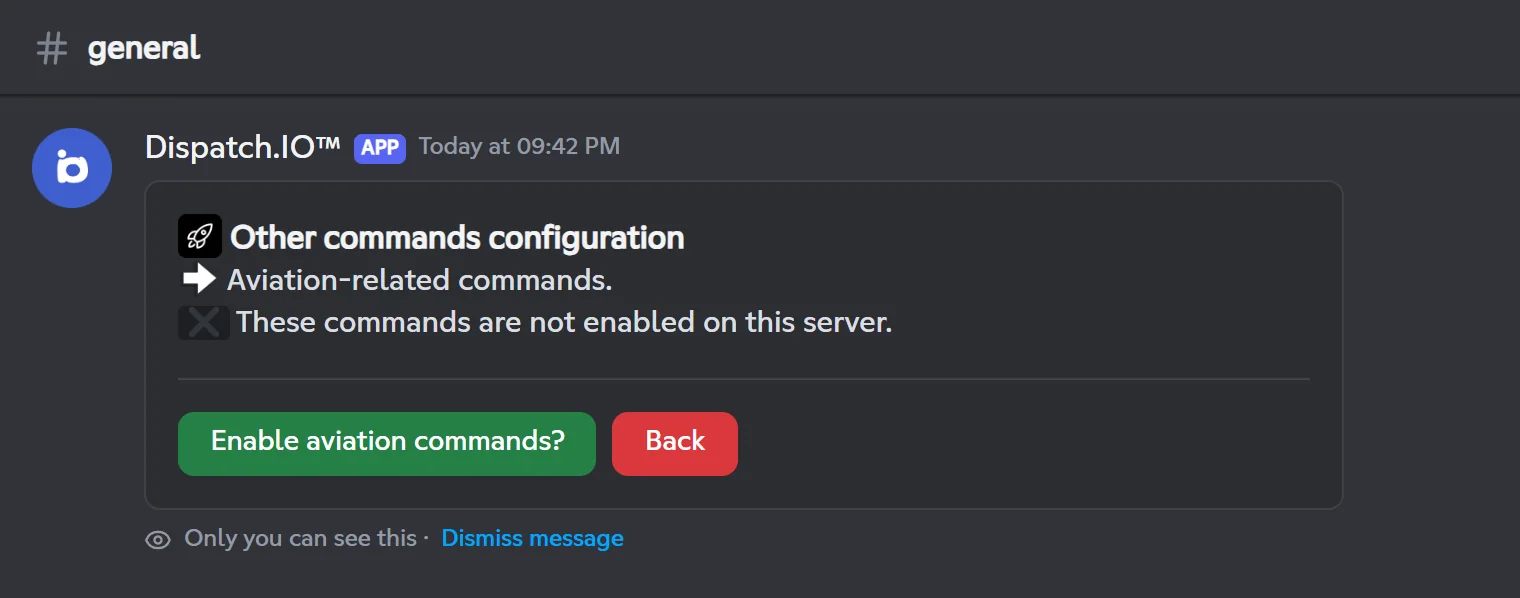
The message then says the commands are enabled and the button turns into Disable aviation commands?. From /config, you have to wait one minute between two changes; otherwise the bot replies "You have reached the limit of 1 uses for this command." with the time left.
What happens next
/zulu,/metarand/frequenciesare added to your server's commands only. They show up in Discord within a few seconds; if they don't, reload Discord (Ctrl+R on desktop).- Turning the pack off removes these commands from the server.
- Every change is logged in the General Server Logs channel, if one is set ("The aviation commands has been enabled.").
UTC time: /zulu
/zulu gives the UTC time (known as "Zulu"), used in aviation for flight plans and exchanges with ATC.
/zuluShows UTC (Zulu) time in aviation format, in hours and with the date.
Syntax
/zuluMember permission
None (every member, aviation pack enabled)
Bot permission
No specific permission
Where to use it
Server only, when the aviation pack is enabled
Rate limit
3 uses every 20 seconds
Plan
Free (included in every plan)
Examples
/zulu
Only you can see the reply.
Result on Discord
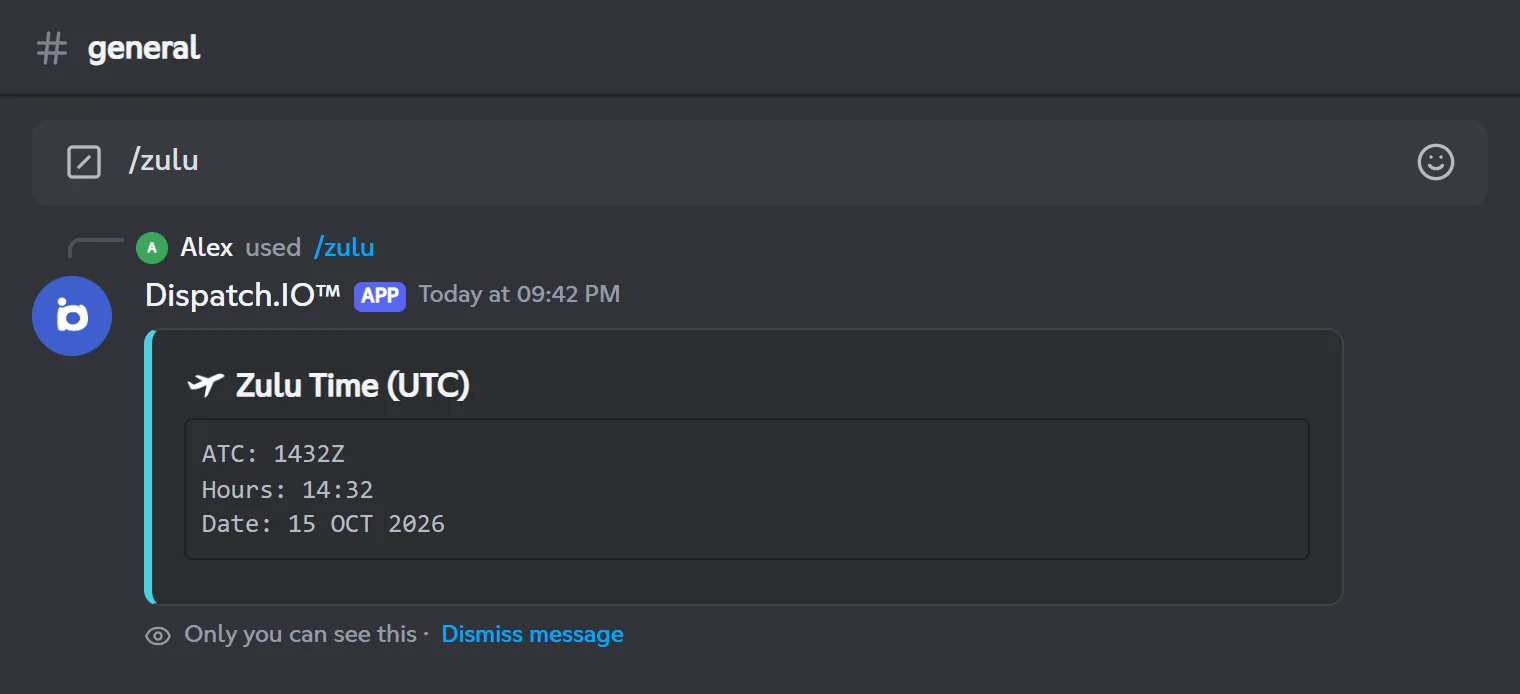
| Line | Content | Example |
|---|---|---|
| ATC | UTC time in aviation format | 1432Z |
| Hours | The same time in hours and minutes | 14:32 |
| Date | Today's date | 15 OCT 2026 |
Airport weather: /metar
/metar shows an airport's latest weather report (METAR) from its 4-letter ICAO code (for example LFPG for Paris-Charles de Gaulle). The bot first shows "Your request is being processed...", then the decoded report.
/metarShows an airport's decoded METAR from its ICAO code.
Syntax
/metar oaci:<ICAO code>Options
| Option | Type | Required | Description |
|---|---|---|---|
oaci | Text (4 characters) | Yes | The airport's ICAO code, for example LFPG. Upper or lower case. |
Member permission
None (every member, aviation pack enabled)
Bot permission
No specific permission
Where to use it
Server only, when the aviation pack is enabled
Rate limit
3 uses every 20 seconds
Plan
Free (included in every plan)
Examples
/metar oaci:LFPG/metar oaci:egll
Only you can see the reply. Data provided by AVWX.
If the code is unknown or no METAR is published: "This metar is not valid or not exist.".
Result on Discord
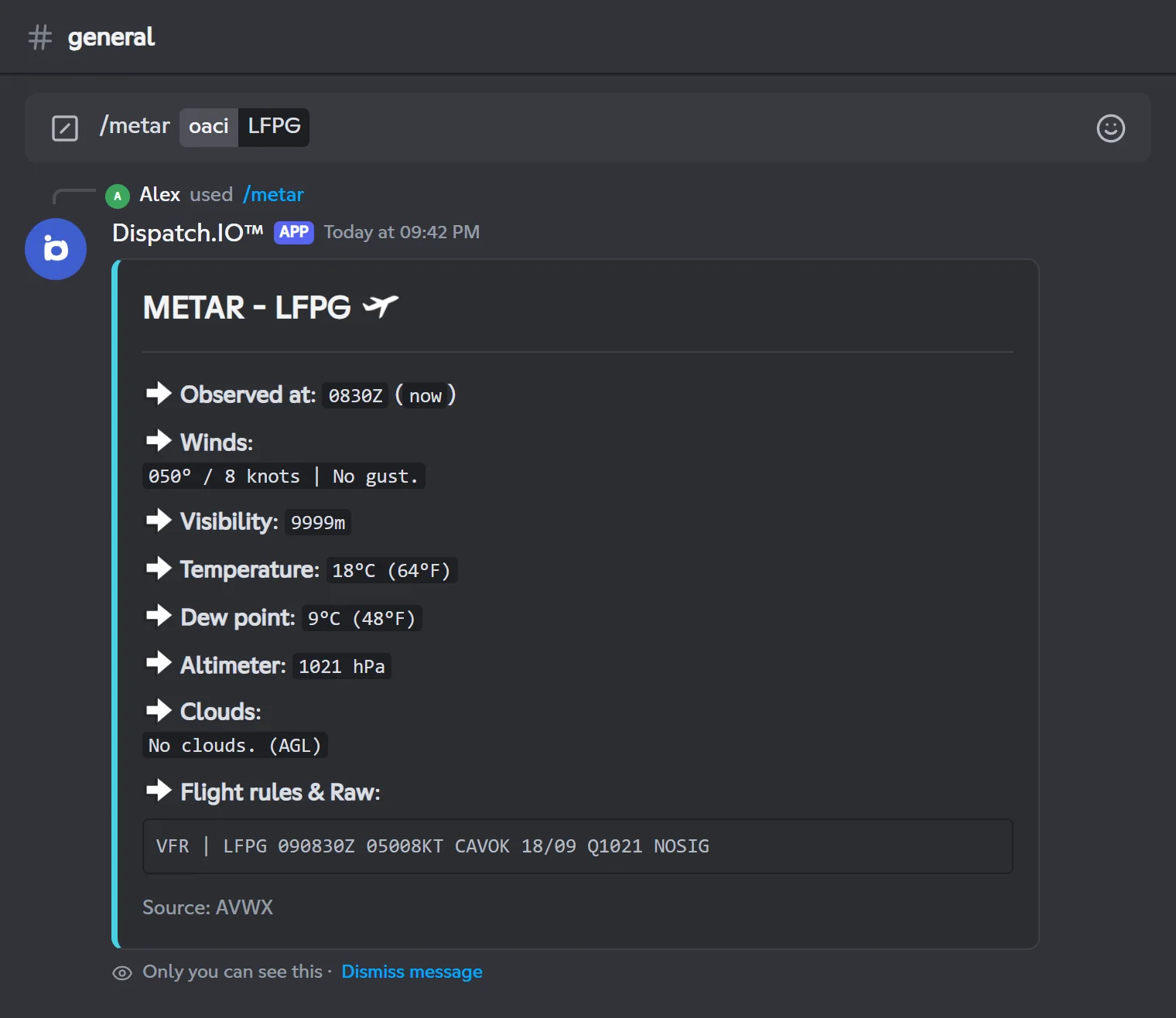
| Line | Content |
|---|---|
| Observed at | The observation time (Zulu format) and how long ago it was |
| Winds | Direction in degrees and speed in knots, any variable directions, gusts or "No gust." |
| Visibility | In metres, or in miles (SM) depending on the station's country |
| Temperature / Dew point | In °C and °F |
| Altimeter | The pressure (QNH) in hPa, or in inHg depending on the station |
| Clouds | Each layer (Few clouds, Scattered clouds, Broken clouds, Overcast clouds…) with its height in feet above ground, or "No clouds." |
| Flight rules & Raw | A flight rules category and the raw METAR |
Flight rules category
The category (VFR, MVFR, IFR or LIFR) is computed by the bot and isn't reliable for now: for example, it shows LIFR as soon as the METAR contains a cloud layer. Rely on the raw METAR shown next to it.
ATC frequencies: /frequencies
/frequencies lists an airport's control positions on the IVAO network, with their frequencies. The reply is public: handy to share before a flight session.
/frequenciesShows an airport's IVAO information and the frequencies of its ATC positions.
Syntax
/frequencies oaci:<ICAO code>Options
| Option | Type | Required | Description |
|---|---|---|---|
oaci | Text (4 characters) | Yes | The airport's ICAO code, for example LFPG. Upper or lower case. |
Member permission
None (every member, aviation pack enabled)
Bot permission
No specific permission
Where to use it
Server only, when the aviation pack is enabled
Rate limit
3 uses every 20 seconds
Plan
Free (included in every plan)
Examples
/frequencies oaci:LFPG
In Discord set to French: /fréquences oaci:
Public reply. Data provided by IVAO, frequencies in MHz.
Result on Discord
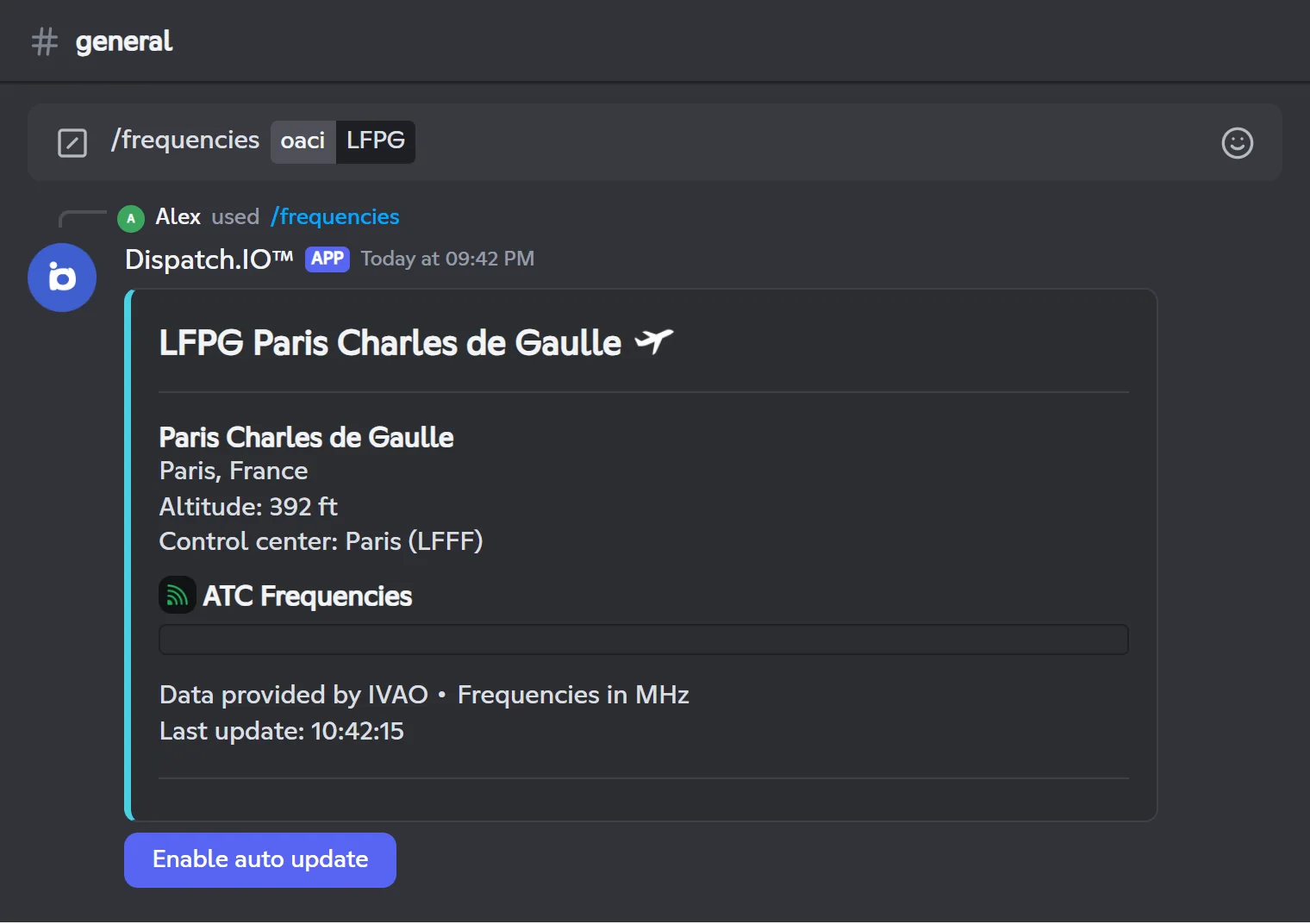
The reply contains:
- The airport: its code and name, the city, the country and the elevation in feet.
- The control center the airport depends on (name and code), or
N/A. - The ATC frequencies: one line per position (Delivery, Ground, Tower, Approach, Departure, Control, ATIS…), with its frequency, its callsign (for example
LFPG_TWR) and an Active (green) or Inactive (red) status. - The source and the time of the last update.
Note
The Active / Inactive status comes from the position data IVAO provides for the airport: it doesn't necessarily mean a controller is online right now.
Discord in English
If your Discord app is in English, the frequency list is currently missing: the block stays empty. It shows up normally with Discord in French.
Auto update
The Enable auto update button refreshes the reply every 30 seconds for 2 hours. It turns green and shows the time left ("Auto-update (120min remaining)"). Click it again to stop. Only the person who ran the command can use this button; for anyone else, Discord shows "This interaction failed".
Possible error messages:
| Message | Explanation |
|---|---|
| Airport not found. Check the ICAO code. | IVAO doesn't know this code: check the 4 letters. |
| No frequencies available for this airport. | IVAO has no ATC position registered for this airport. |
Troubleshooting
| What you see | Explanation and fix |
|---|---|
| The commands don't show up in Discord | The pack isn't enabled on this server, or Discord hasn't refreshed the list yet: check the Other commands page, then reload Discord (Ctrl+R). |
| You can't type a code shorter or longer than 4 characters | That's expected: an ICAO code is exactly 4 characters long. |
| "This metar is not valid or not exist." | Unknown ICAO code, or no METAR published for this airport. |
| The frequency list is empty | Your Discord is in English: see the warning in the /frequencies section. |
| The auto update button answers "This interaction failed" | Only the person who ran /frequencies can use it. |
| "Oh no, it seems there’s a problem..." | Unexpected error (weather service or IVAO unreachable, for example): try again later or contact support with the attached .log file. |
For other issues, see the Troubleshooting page.
Related pages
- Other commands: the dashboard page that turns command packs on.
- Bot configuration: everything
/configoffers. - All commands: the full command list.